Skip to content
Talking-Head Sales Videos That Earn More Replies
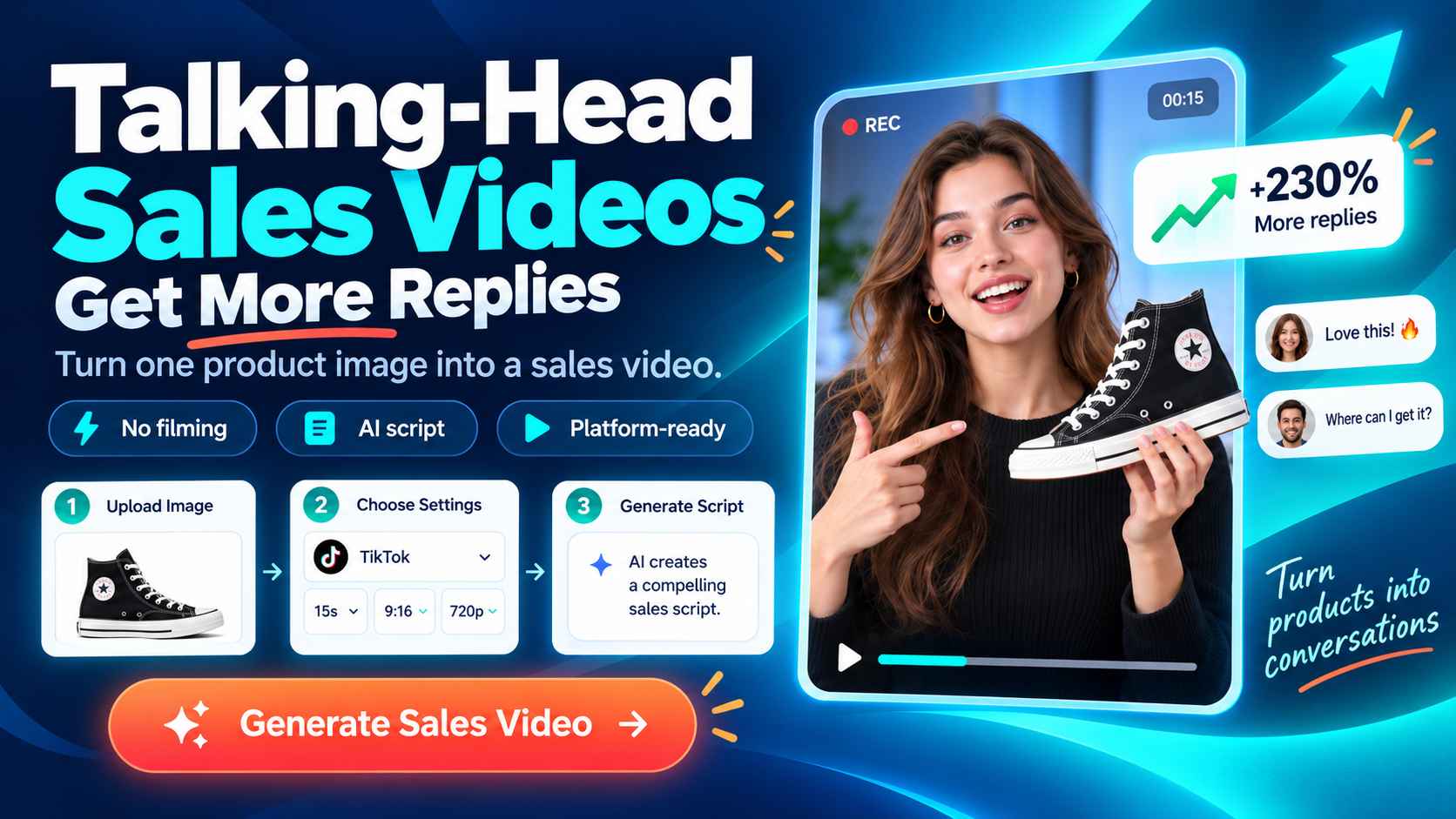
A talking-head sales video is simple on paper: one person speaks directly to a prospective customer.
That simplicity is exactly why it can work. In a busy inbox, a real person with a relevant point can feel more approachable than another polished pitch deck or a long block of copy.
Still, recording yourself is not a strategy on its own. A video that starts with a company bio, runs for three minutes, and ends with a generic demo request is easy to ignore. The useful version is short, specific, and built around the point in the sales process where the buyer is right now.
This guide explains how to plan, record, and reuse talking-head sales videos without turning every message into a production project, including where tools such as EzRemove can support simple video preparation.
Why the Talking-Head Format Works in Sales
Sales conversations depend on trust, clarity, and timing.
A direct-to-camera video can add facial expression, tone, and context to an otherwise flat message. It gives a prospect a sense of who is reaching out before they agree to a call.
That does not mean every sales interaction needs video.
A detailed technical explanation may be better as a screen recording. A complex proposal may need a live conversation. Talking-head video is most useful when the goal is to open a conversation, explain one relevant idea, or keep momentum after a useful interaction.
The format also lowers the barrier for getting started. A modern phone or laptop camera is usually enough.
Buyers are more likely to notice:
- Poor audio quality
- Unclear purpose
- Irrelevant messaging
than the absence of professional recording equipment.
Match the Video to the Sales Moment
The best sales video is not always the most polished one.
It is the one that gives the viewer a clear reason to watch at that moment.
Decide where the video belongs in the sales process before writing your script.
| Sales Moment | Goal | Recommended Length | Format | Next Step |
|---|---|---|---|---|
| Cold outreach | Earn attention and a reply | 30-45 seconds | Presenter on camera | Reply with a view or question |
| First follow-up | Add context to a previous message | 45-60 seconds | Presenter with one visual | Confirm relevance |
| Pre-meeting reminder | Reduce no-shows | 15-30 seconds | Simple webcam video | Keep or reschedule the meeting |
| Post-meeting recap | Reinforce useful conversation | 60-90 seconds | Presenter plus screen | Agree on the next step |
| Stalled opportunity | Reopen a discussion with value | 45-60 seconds | Presenter with a new proof point | Revisit one specific issue |
For cold outreach, resist the urge to explain your whole offer.
Your job is to earn the next small interaction.
For a first contact message, a simple reply or permission to share more information is usually a better next step than immediately asking for a full product demo.
A useful question to ask before recording:
What should the buyer know, decide, or do differently after watching?
If the answer is "understand everything we sell," the message is too broad.
A better answer might be:
- Reply if this problem is currently on your roadmap.
- See why this conversation may be worth having.
- Review one idea that could improve the current process.
Sales teams often use the same video format at the wrong moment.
A polished company overview may work after an inbound lead asks for background, but it rarely earns attention in a first cold email. A screen recording may be useful after a technical discussion, but it may be too much for a simple meeting reminder.
Start with the buyer's immediate question, then choose the format that answers it with the least effort.
Start With Relevance, Not Your Company Intro
The opening seconds determine whether the viewer keeps watching.
Many sales videos lose momentum because they begin with:
- Seller name
- Company introduction
- Product category
This information matters, but it should come after explaining why the message is relevant.
Start with an observation connected to the prospect's world.
It could be:
- A new market expansion
- A hiring change
- A product launch
- A common industry challenge
Then connect that observation to a possible business impact.
A practical opening structure:
"I noticed your team is expanding into [market or segment]. Teams at that stage often find that [specific process] becomes harder to manage. I recorded this because there may be a straightforward way to reduce that friction."
This is not a universal script.
It is a reminder that the buyer should be the subject of the opening, not the seller.
Write a 45-Second Video That Sounds Human
Short scripts work best as talking points.
Reading every word from a screen can make a helpful message feel unnatural, while improvising without structure can easily lead to unnecessary details.
A simple 45-second structure:
1. 0-8 seconds: Introduce the context
Mention one real trigger or challenge.
2. 8-22 seconds: Explain the impact
Show that you understand why the issue matters.
3. 22-35 seconds: Provide value
Share one concise example, insight, or proof point.
4. 35-45 seconds: Make a low-friction ask
Invite a reply, short conversation, or permission to send additional information.
For example:
"I noticed your support team is hiring across two regions. Teams at this stage often experience inconsistent handoffs before they see the impact in reporting. We recently helped another distributed team identify those gaps. If useful, I can share the three questions they used."
The CTA is deliberately small.
Asking a cold prospect to schedule a full demo before they understand the value creates unnecessary friction.
A reply or permission to share more information creates a more natural next step.
Give Buyers a Reason to Press Play
A thoughtful video can still be skipped if the email around it feels generic.
The subject line, the first sentence, and the thumbnail all influence whether someone decides to watch. They should support the same message as the video instead of creating another sales pitch.
Keep the subject line short and clear.
For example:
A thought on your new support team
gives the recipient enough context without creating unnecessary urgency.
In the email body, one sentence is usually enough:
I recorded a 40-second note because I noticed something relevant to how your team is growing.
Then let the video carry the explanation.
Your thumbnail should make it obvious that a real person created the video for a reason.
A good thumbnail can include:
- A clear presenter image
- A relevant product visual
- A simple context indicator
Avoid:
- Over-designed graphics
- Small unreadable text
- Generic webinar-style thumbnails
The preview should always match the actual video.
If the subject line promises an onboarding insight, the first seconds of the video should not immediately switch to an unrelated product feature.
Small mismatches reduce trust.
Personalization Has a Time Budget
Personalization is not a competition to prove how much research you completed.
Its purpose is to make a useful message specific enough that the buyer recognizes their situation.
Set a reasonable research limit based on the account value.
For high-value accounts, you may review:
- Company website
- Recent announcements
- Buyer role
- Public business changes
For broader outreach, a relevant industry pattern and role-specific concern may be enough.
Before recording, ask:
- Can I reference a public detail without making assumptions?
- Does this information change my recommendation or question?
- Would I explain the same point during a real conversation?
If the answer to the second question is no, remove the detail.
The best personalization changes the conversation instead of simply proving you researched the prospect.
How to Create Talking-Head Sales Videos with AI
Creating personalized sales videos traditionally requires recording yourself, preparing scripts, and editing multiple versions for different platforms.
For ecommerce sellers and marketers who need frequent product videos, this process can quickly become time-consuming.
AI video generation provides a simpler way to create presenter-led sales content without recording every video manually.
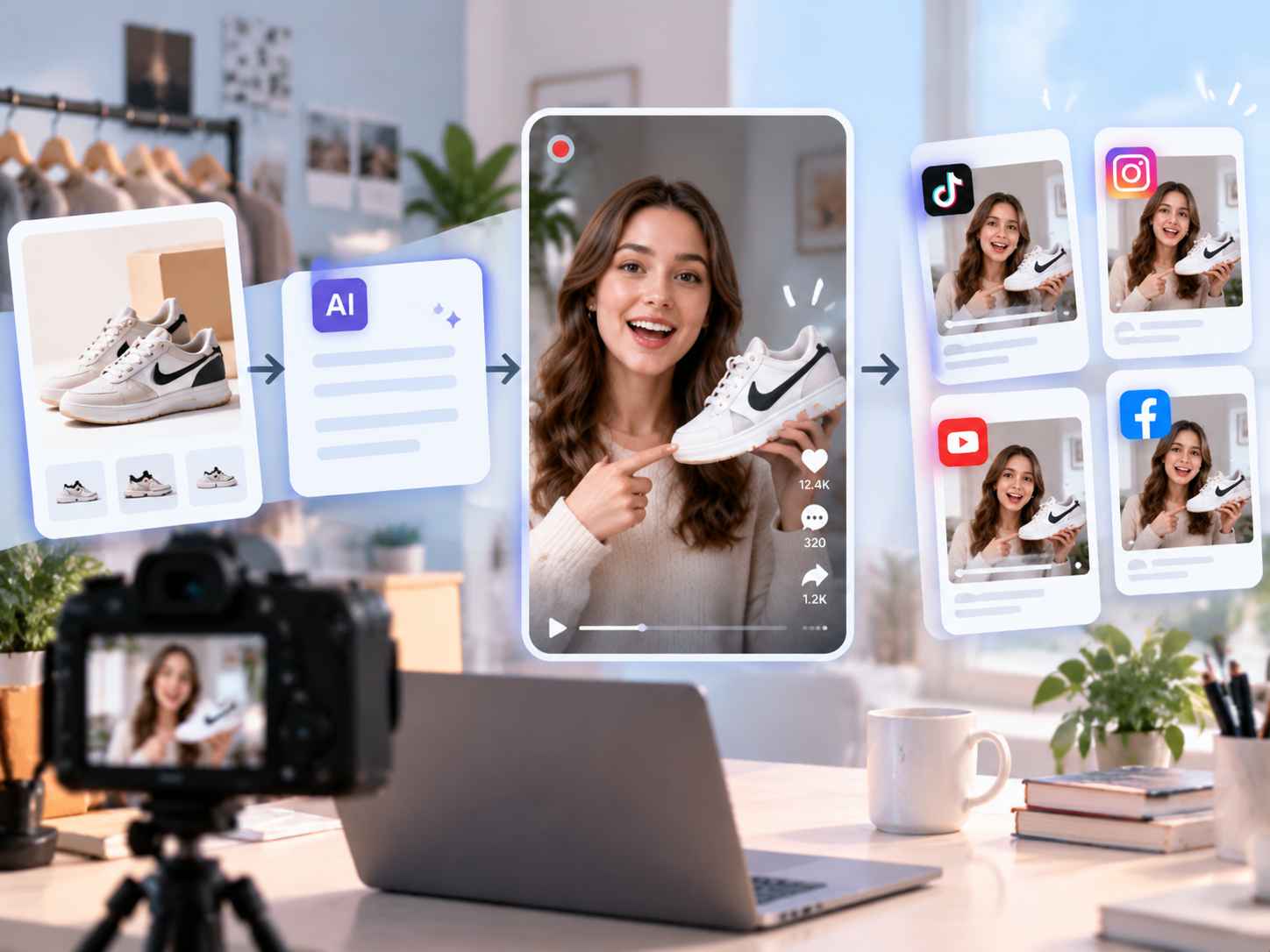
With tools like EzRemove AI Video Generator, businesses can turn product images into engaging talking-head sales videos with AI presenters, generated scripts, and platform-ready formats.
Instead of setting up cameras, recording multiple takes, and editing each version manually, sellers can focus on the product message while AI helps create a complete video workflow.
Create a Talking-Head Sales Video in a Few Steps
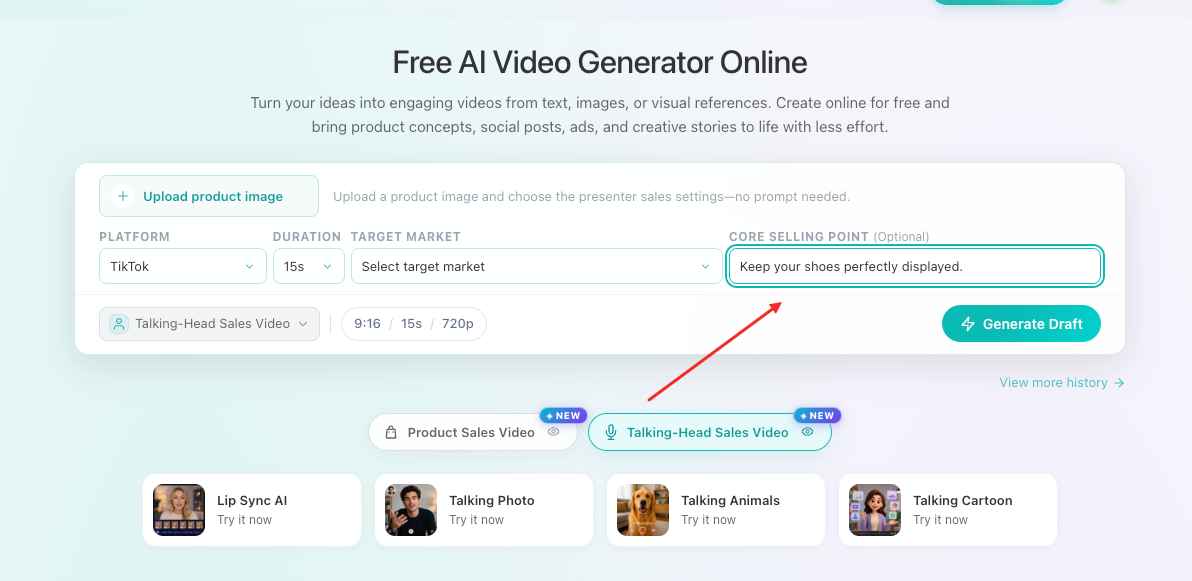
1. Upload Your Product Image
Start by uploading the product image you want to promote.
A clear product image gives AI more information about the product appearance and helps create a more suitable sales presentation.
For ecommerce sellers, this makes it easier to transform existing product photos into promotional videos without preparing additional video footage.

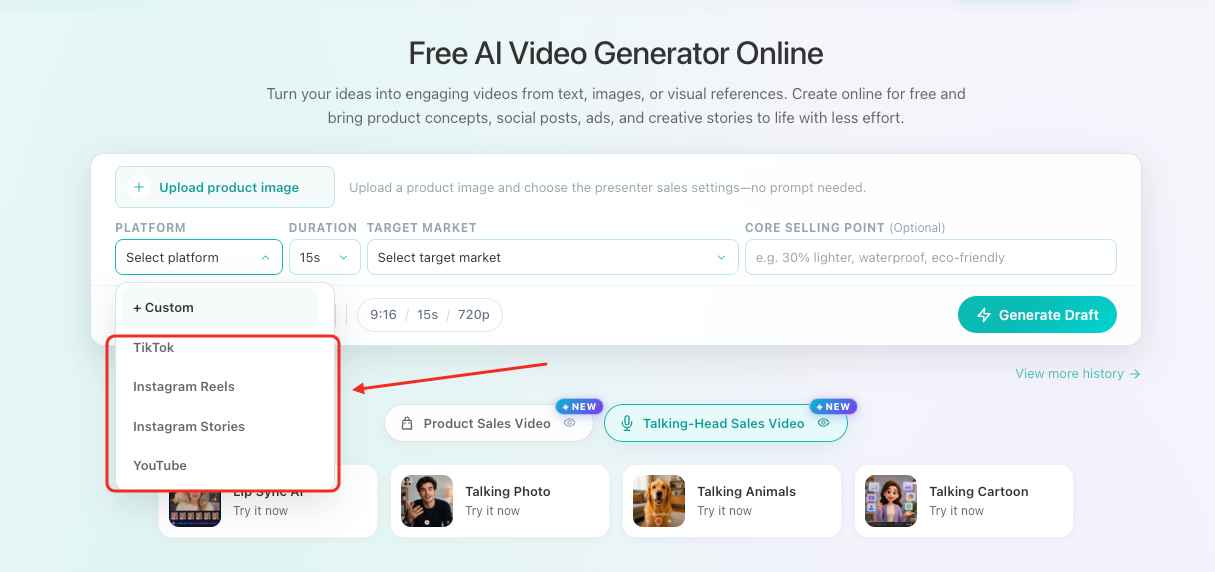
2. Choose Your Promotion Platform
Select where you plan to publish your video.
Supported content destinations may include:
- TikTok
- Instagram Reels
- Instagram Stories
- YouTube
Different platforms have different content formats and audience expectations.
Choosing the right platform helps create videos that better match your marketing channel.
3. Customize Your Video Settings
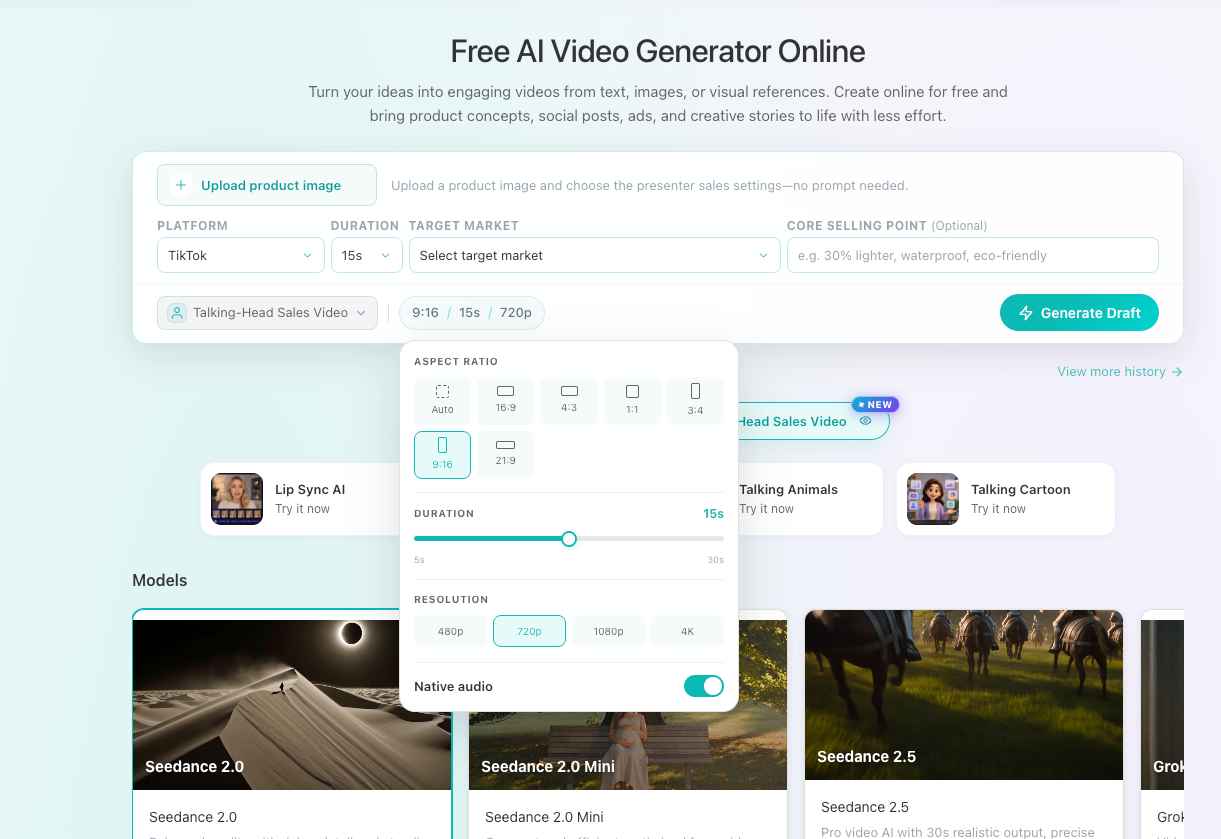
Before generating the video, adjust your preferred settings:
- Video duration
- Aspect ratio
- Resolution
These options allow you to prepare videos for different use cases, from short-form social media content to product promotion campaigns.
4. Add Your Key Selling Points
Provide the main product advantages you want the video to highlight.
For example:
- Product features
- Unique benefits
- Materials or specifications
- Promotional messages
These details help AI create a more focused sales script instead of a generic product introduction.
5. Review and Edit the AI-Generated Script
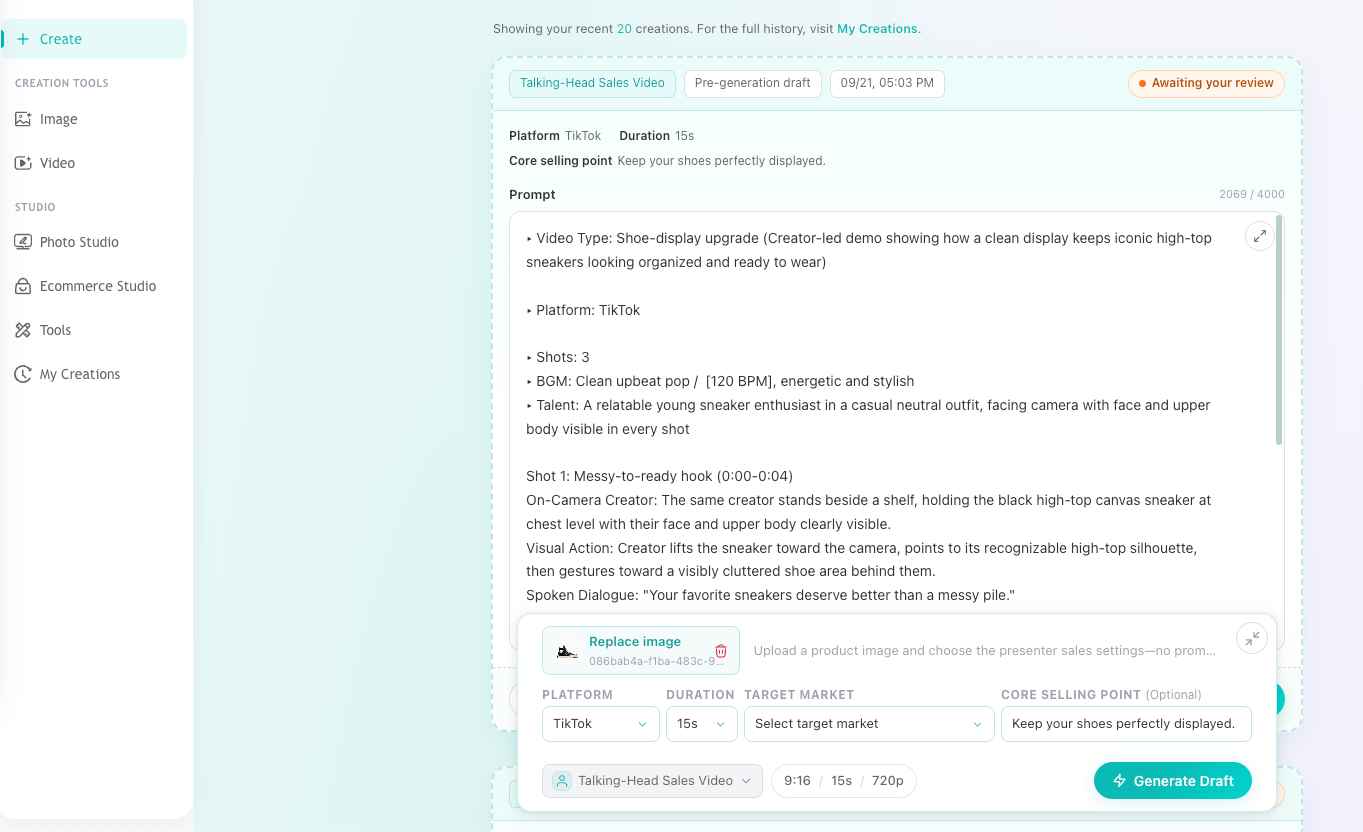
After submitting your product information, AI generates a draft sales script based on your product and marketing goal.
Before creating the final video, you can review and adjust the script to match your preferred messaging.
You can refine:
- Product descriptions
- Brand tone
- Key selling points
- Call-to-action messages
This step gives you control over the final communication while reducing the time needed to write sales scripts manually.
6. Generate Your Talking-Head Sales Video
Once the script is ready, generate your final video.
The AI presenter delivers your product message in a natural talking-head format, combining:
- Product visuals
- Sales messaging
- Platform-friendly video settings
The final result is a ready-to-use promotional video that can be shared across ecommerce stores, social media platforms, and marketing campaigns.
Why AI Talking-Head Videos Help Ecommerce Sellers Create More Content
Product marketing often requires creating multiple videos for different products, platforms, and audiences.
Recording every video manually can quickly become difficult to scale.
AI-generated talking-head videos help sellers produce more promotional content without repeatedly filming themselves.
They are useful for:
- Product launches
- TikTok and Instagram promotions
- Ecommerce advertisements
- Social media campaigns
- Product demonstrations
- Personalized customer outreach
For teams that need frequent product videos, AI video generation creates a faster workflow while keeping the content personalized and engaging. If you want to go beyond production and build each video around a clearer shopper need, selling point, and next action, see our guide on how to create a product sales video that converts.
Make the Setup Trustworthy Without Building a Studio
The camera does not have to be expensive, but the image should be easy to watch.
A simple setup can still create professional-looking sales videos.
Follow these basic guidelines:
- Keep the camera at or slightly above eye level
- Frame yourself from roughly mid-chest upward
- Look at the lens when delivering the main point
- Keep the camera stable
A stable camera position feels more intentional than a handheld recording.
Your background should support the message instead of competing with it.
Choose a clean and quiet area with some depth behind you.
Avoid:
- Distracting objects
- Strong backlighting
- Busy movement behind the presenter
A clean presenter image can support the message, but the content should remain the focus.
Clear communication and good audio usually create more trust than an expensive setup.
Audio deserves extra attention.
Before recording:
- Choose a quiet room
- Reduce background noise
- Use headphones or an external microphone if needed
- Test a short recording before creating multiple videos
The 60-Second Pre-Recording Check
Before recording, confirm:
- Is the camera stable and positioned correctly?
- Is your face properly lit?
- Is your voice clear without noticeable echo?
- Is the background free from distractions?
- Can you explain the buyer's situation and CTA clearly?
This simple check prevents spending more time fixing videos afterward than preparing them correctly.
Keep the Viewer Moving
Talking-head videos do not need to stay on one uninterrupted frame.
Use editing to remove:
- Long pauses
- Repeated thoughts
- Unnecessary introductions
Add visuals only when they help viewers understand the message.
Useful visual additions include:
- Product screenshots
- Website examples
- Simple diagrams
- Customer quotes
- Screen recordings
Avoid adding motion effects to every sentence.
Fast cuts and excessive animations can make short videos harder to follow.
A simple rhythm usually works better:
- Direct-to-camera opening
- Supporting visual in the middle
- Direct CTA at the end
Screen sharing is especially useful after a conversation has started.
A seller can keep their face visible while showing:
- A workflow
- A product example
- A solution to a customer question
This keeps the human connection while making the information easier to verify.
Avoid the Mistakes That Make Videos Easy to Ignore
Do Not Make the Video About Your Company
Prospects do not need another company overview in the first message.
Start with a situation they recognize, then explain how you may help.
Do Not Put Multiple Sales Messages Into One Video
One video should focus on:
- One prospect
- One idea
- One CTA
If you have multiple valuable points, create separate videos for different stages of the sales process.
Do Not Confuse Company Names With Personalization
Mentioning a company name does not automatically make a message personal.
Real personalization comes from information that changes the conversation.
Do Not Wait for a Perfect Recording
A small pause or imperfect word can make a video feel more authentic.
Re-record only when:
- The main idea is unclear
- The audio quality is poor
- Important information is incorrect
Otherwise, send the message while it is still relevant.
Follow Up After the View Without Chasing the View
Watching behavior provides context, not a guaranteed signal.
Someone may watch because the subject line caught their attention but decide the timing is wrong.
Another person may plan to watch later and never return.
Do not send messages like:
"I saw you watched my video."
Instead, continue the conversation around the original topic.
For example:
"I wanted to check whether the regional handoff issue I mentioned is something your team is currently working through."
This gives the recipient an easier way to respond.
For viewers who watched most of the video:
- Continue discussing the problem
- Ask a simple question
- Provide additional value
For people who did not watch:
Do not immediately resend the same video.
Instead:
- Send a short follow-up message
- Restate the useful observation
- Offer a relevant resource
This keeps the sales process helpful even when video is not the buyer's preferred format.
Build a Small Library Your Team Will Actually Use
Personal videos are valuable, but not every explanation needs to be recorded from scratch.
Create reusable video assets for questions your team receives repeatedly.
Useful first assets include:
- Short company introductions
- Common objection responses
- Product walkthroughs
- Industry-specific customer stories
- Meeting reminders
Each video should have:
- A defined audience
- A clear sales stage
- A specific next action
Without this structure, a video library can quickly become a folder of unused files.
Teams can combine reusable and personalized content.
For example:
- Record a short personalized introduction
- Add a reusable product explanation
- End with a specific CTA
This creates personal context without requiring every salesperson to recreate the same content.
AI-generated presenter videos can also help teams build repeatable product explanations, localized content, and marketing assets without recording every version manually.
Give the Library an Owner
Someone should manage:
- Video accuracy
- Usage scenarios
- Sales stages
- Recommended messaging
Without ownership, video libraries often collect:
- Outdated demos
- Old product positioning
- Videos new team members do not trust
Review the library whenever:
- Products change
- Messaging changes
- Sales processes change
For each remaining video, keep notes about:
- Intended audience
- When to send it
- Expected CTA
This is more useful than simply organizing files by name.
Measure Progress, Not Just Plays
A view is only one signal.
It does not automatically mean the prospect is interested or that the video worked.
Track behaviors that matter:
- Replies
- Meetings booked
- Meeting attendance
- Agreed next steps
- Opportunity progress
When testing videos, change one element at a time:
- Opening sentence
- Video length
- Thumbnail
- CTA
A video can receive many views but still fail if it creates curiosity without encouraging action.
Look at performance together with real conversations.
A low play rate may indicate:
- Weak subject line
- Wrong timing
- Poor targeting
A high play rate without replies may indicate:
- Interesting content
- Unclear next step
The surrounding context usually reveals more than the dashboard alone.
The Best Place to Start
Choose one point in your existing sales process where prospects usually become quiet.
Create one short message for that moment.
Record it with a simple setup.
Test it with a small and relevant audience.
The goal is not to turn every salesperson into a professional presenter.
The goal is to make important sales communication:
- Clearer
- More personal
- Easier to act on
Talking-head sales videos work best when they respect the viewer's time, show genuine relevance, and make the next action obvious.
Start simple, improve the production only when it helps the message perform better.