Skip to content
Step-by-Step Guide to Creating Virtual Model Images for E-Commerce
Fashion moves fast—but photoshoots don’t.
One collection delay can mean missed sales, lost momentum, and a frustrated team stuck waiting on studios, models, and edits.
That’s exactly why brands are switching to virtual models—a faster way to turn clothing into high-quality, on-model visuals without the production chaos.
In this guide, you’ll learn how to use Virtual Model Generator to create scroll-stopping product images, launch collections faster, and keep your brand looking sharp everywhere it shows up.
Why Virtual Models Are Essential for E-Commerce
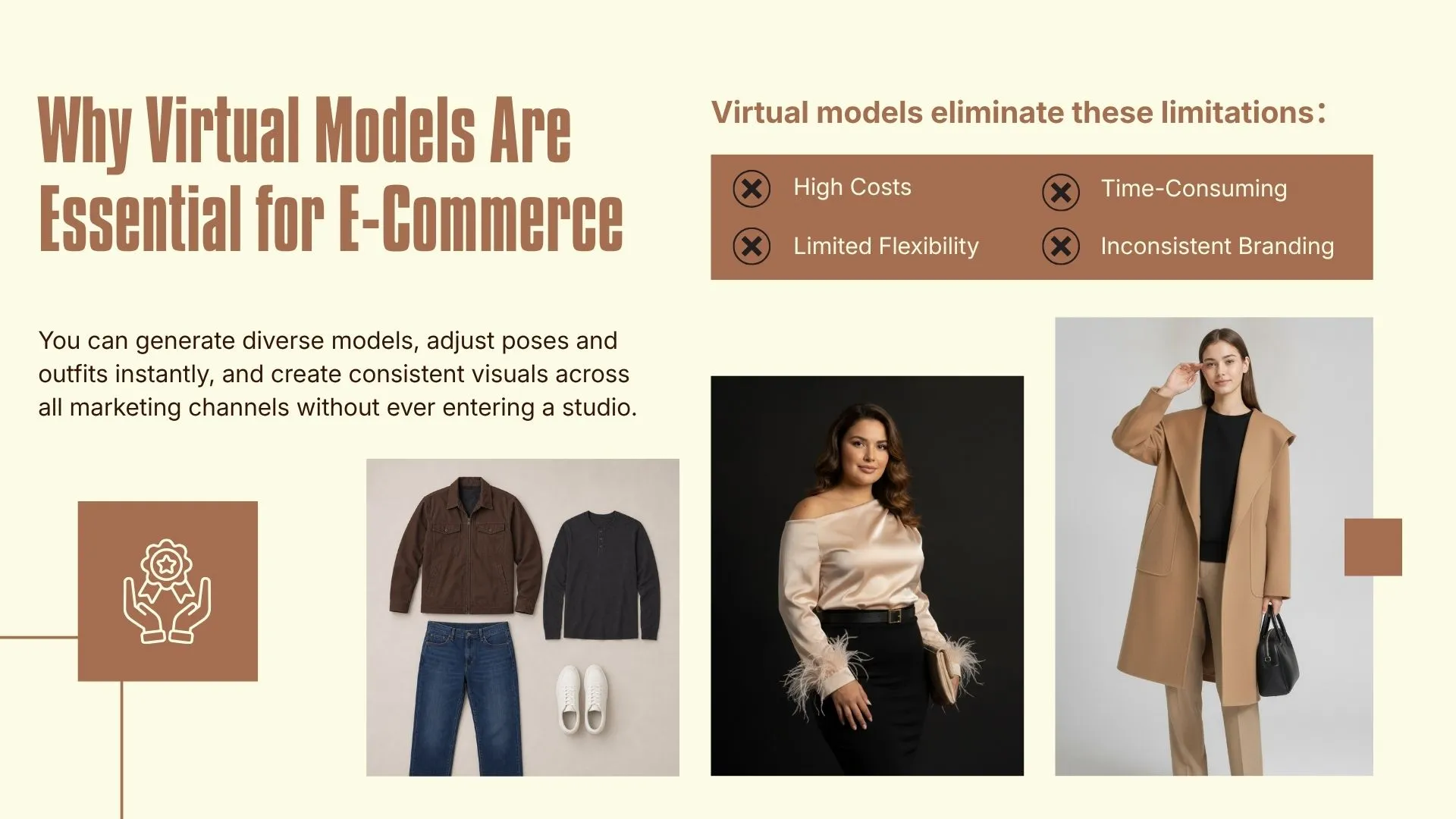 Fashion brands face multiple challenges with traditional product photography:
- High Costs: Coordinating models, photographers, studios, and stylists can cost thousands per shoot.
- Time-Consuming: From planning to final editing, producing a single collection can take weeks.
- Limited Flexibility: Adding new poses, outfits, or backgrounds often requires a completely new photoshoot.
- Inconsistent Branding: Different shoots can produce variations in lighting, model styling, and visual tone.
Virtual models eliminate these limitations. You can generate diverse models, adjust poses and outfits instantly, and create consistent visuals across all marketing channels without ever entering a studio. For e-commerce sellers, marketers, and fashion designers, this unlocks a new level of speed, cost-efficiency, and creative flexibility. You can also enhance your product images further using the free AI photo editor to refine backgrounds, adjust lighting, and polish visuals in minutes.
The Missing Piece Most Brands Overlook: Model Diversity
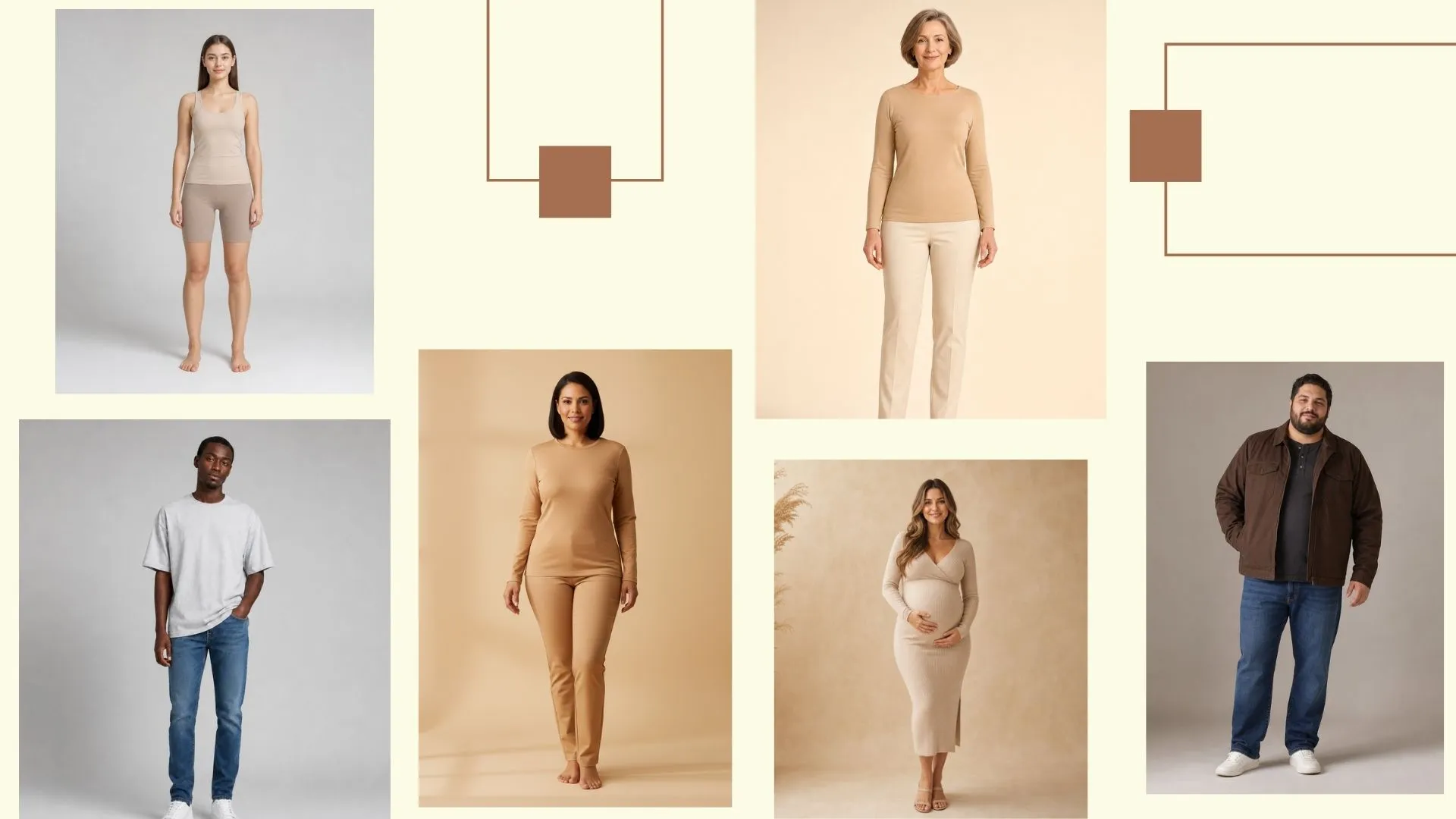 One of the most underrated advantages of virtual models is the ability to scale visual diversity without increasing production complexity.
In traditional photography, diversity is always constrained by casting availability, budget limitations, and scheduling logistics. As a result, most brands can only showcase a narrow range of model types within each campaign, which often fails to reflect the real diversity of their customer base.
Ethnicity Diversity
Virtual models make it possible to represent a broad range of ethnic backgrounds in product imagery, helping brands create visuals that feel more globally relevant and inclusive.
Rather than being restricted to a small set of models from a single casting call, ecommerce teams can tailor their visuals for different regions, cultural contexts, and customer segments.
This becomes especially valuable for brands operating across international markets such as Shopify stores, Amazon global listings, or DTC websites targeting multiple countries.
Traditional Photoshoots vs EzRemove Virtual Model Workflow
| Dimension | Traditional Photoshoots | EzRemove Virtual Model |
|---|---|---|
| Single Campaign Cost | $3,000–$10,000+ per shoot (models, studio, photographer, post-production) | Daily free credits available + affordable credit packages that never expire |
| Content Production Speed | Typically 1–3 weeks from planning to final delivery | Generate ready-to-use product visuals in seconds |
| Campaign Scalability | Requires new budget, setup, and coordination for each campaign | Scale unlimited campaigns instantly with EzRemove virtual model workflow |
| SKU Coverage Efficiency | Limited outputs per photoshoot session | One upload generates multiple models, poses, and style variations |
| Ad Creative Testing | Slow and expensive A/B testing for different visuals | Rapidly generate multiple ad variations for performance testing |
| Workflow Flexibility | Fixed outputs once the shoot is completed | Fully flexible generation with adjustable models, poses, and styles |
| Multi-Channel Adaptation | Separate shoots often required for ecommerce, ads, and social media | One workflow adapts seamlessly across Shopify, Amazon, and social platforms |
| Licensing & Copyright | Model usage rights, contracts, and licensing restrictions can be complex and costly | Fully commercial-ready outputs with clear usage rights and no additional licensing fees |
This table highlights why many brands are shifting to AI-powered virtual models. Not only do they save money, but they also increase productivity and allow brands to maintain a cohesive visual identity.
Best AI Virtual Model Generators in 2026
As AI virtual model technology becomes a core part of ecommerce content creation, more tools are emerging to help brands generate on-model product visuals without traditional photoshoots. Each platform offers different strengths, from basic image generation to more advanced editing capabilities or niche fashion visualization features. However, not all tools are designed with real ecommerce workflows in mind, especially when it comes to scaling product catalogs, maintaining brand consistency, or supporting ongoing marketing campaigns.
For many brands, the gap becomes clear once they move beyond simple image generation and start needing consistent outputs across hundreds of SKUs, multiple ad variations, and different sales channels. This is where limitations in general-purpose tools start to show.
Among all available options, EzRemove stands out as a complete solution built specifically for online sellers and marketing teams, not just a simple image generator. It focuses on real ecommerce needs—such as consistent on-model visuals and streamlined content creation workflows—making it easier for teams to move from product images to fully campaign-ready content without switching between multiple tools.
Below is a comparison of some of the most widely used AI virtual model tools in 2026, including EzRemove Virtual Model Generator, Photoroom Virtual Model Tool, Cutout.pro Virtual Model, FashionDiffusion Virtual Try-On, and Rawshot AI Generator. This comparison evaluates each tool based on real-world capabilities such as ecommerce workflow support, image generation and editing functionality, customization flexibility, batch processing efficiency, and overall suitability for product listing and marketing content creation.
Rather than focusing on isolated features, the table highlights how each platform performs in practical use cases—such as generating on-model product images, supporting fashion customization needs, handling background and visual edits, and enabling scalable content production for ecommerce teams. This helps brands quickly understand which tools are better suited for full ecommerce workflows versus basic image editing, creative experimentation, or fast content generation.
AI Virtual Model Tools Comparison (2026)
| Tool | Strengths | Limitations | Best For |
|---|---|---|---|
| EzRemove Virtual Model Generator | Full ecommerce workflow, replace mode, outfit generation, consistent branding output | Designed primarily for ecommerce use cases (less generic use) | Shopify stores, DTC brands, marketing teams, scalable product catalogs |
| Photoroom Virtual Model Tool | Strong background editing, easy interface, fast image generation | Limited customization for fashion-specific workflows | General ecommerce users and basic product visualization |
| Cutout.pro Virtual Model | Offers multiple AI editing features including virtual try-on and background tools | Output consistency varies depending on input quality | Small businesses and casual product editing |
| FashionDiffusion Virtual Try-On | Strong focus on fashion experimentation and AI styling concepts | Less optimized for commercial ecommerce workflows | Fashion design exploration and concept creation |
| Rawshot AI Generator | Fast generation speed and simple workflow | Limited advanced editing and brand control features | Creators and quick social media content |
Why EzRemove Leads the Category
While most tools focus on either editing or basic AI generation, EzRemove is built around the full ecommerce workflow, which makes a significant difference for real business use.
Instead of just generating isolated images, EzRemove helps brands:
- Create consistent on-model product visuals at scale
- Use replace mode to swap or rebuild outfits instantly
- Generate multiple variations for ads, listings, and campaigns
- Maintain brand consistency across large product catalogs
- Reduce dependency on traditional photoshoots entirely
This makes EzRemove not just another AI tool, but a complete virtual model production system for ecommerce teams.
Step-by-Step Tutorial for Using EzRemove Virtual Model Generator
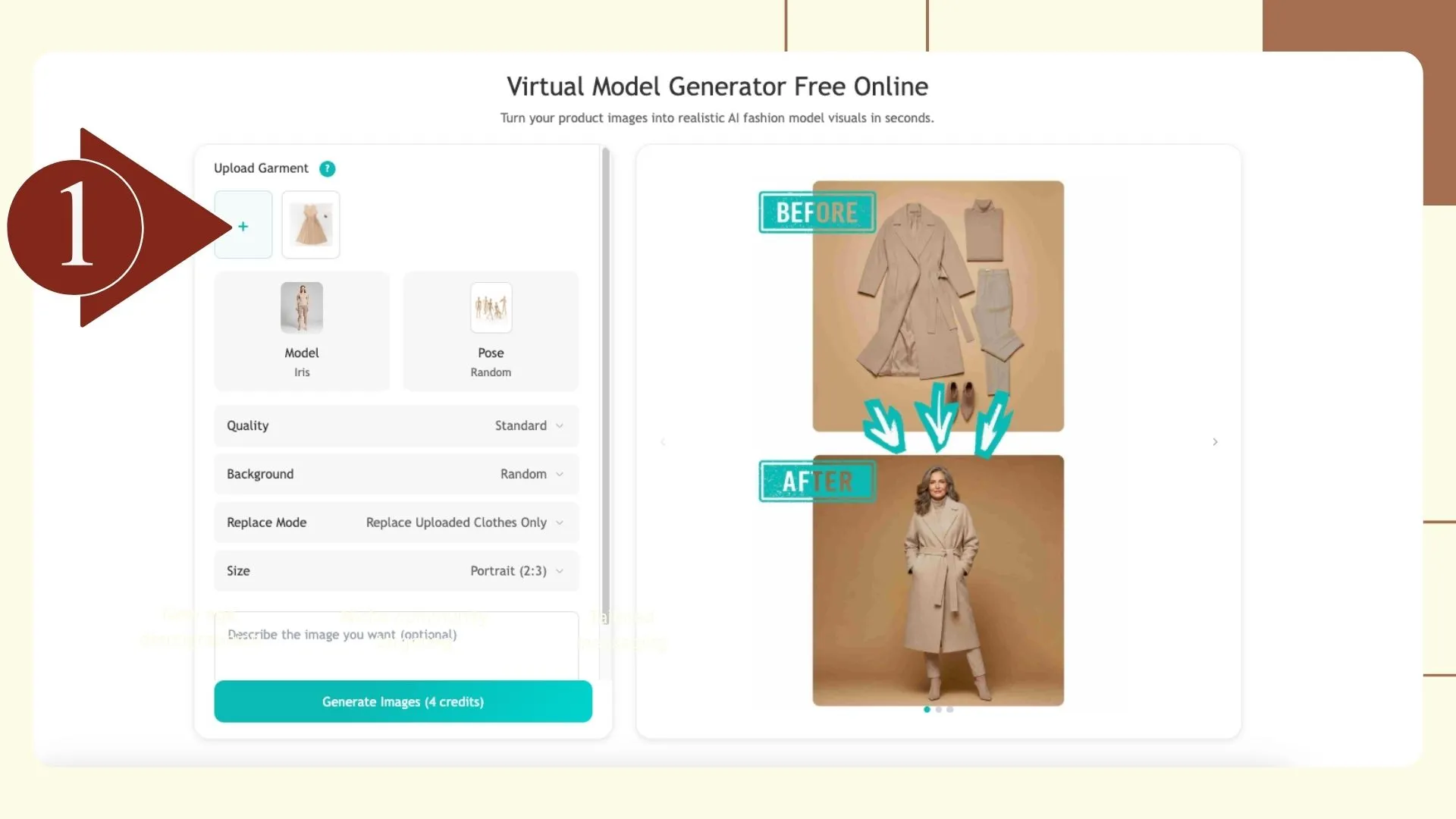
Step 1: Upload Your Product Image
Start by uploading the apparel item or accessory you want to showcase. Virtual models work with dresses, tops, pants, jackets, shoes, and even accessories. Ensure your product images are high-quality, as this helps the AI generate realistic results. 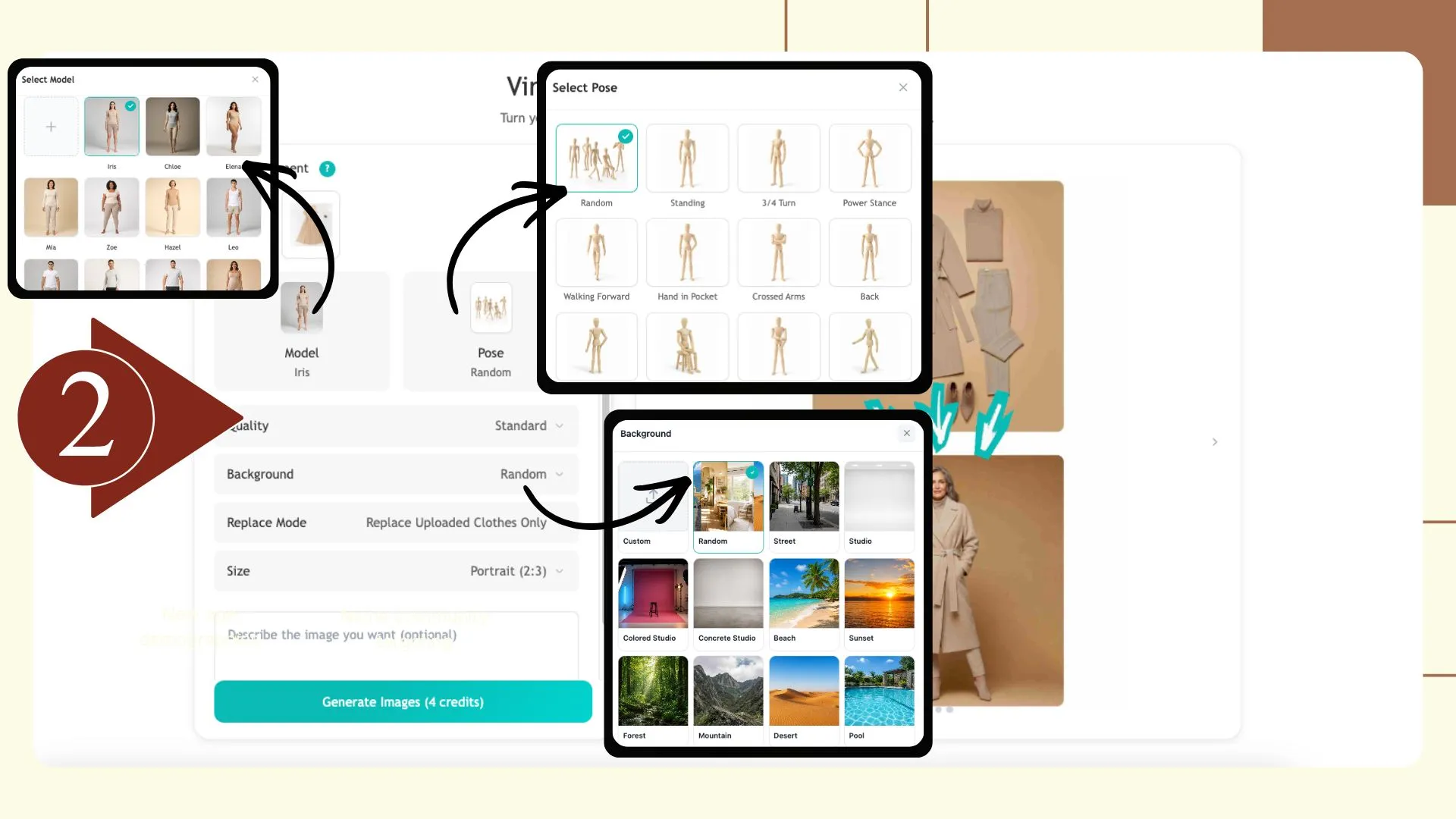
Step 2: Select Your Model, Pose, and Background
Pick a virtual model style that fits your brand, select a pose that highlights the product’s features, and choose a background suitable for your marketing campaign. You can experiment with multiple poses and backgrounds to create a variety of visuals from the same product photo. 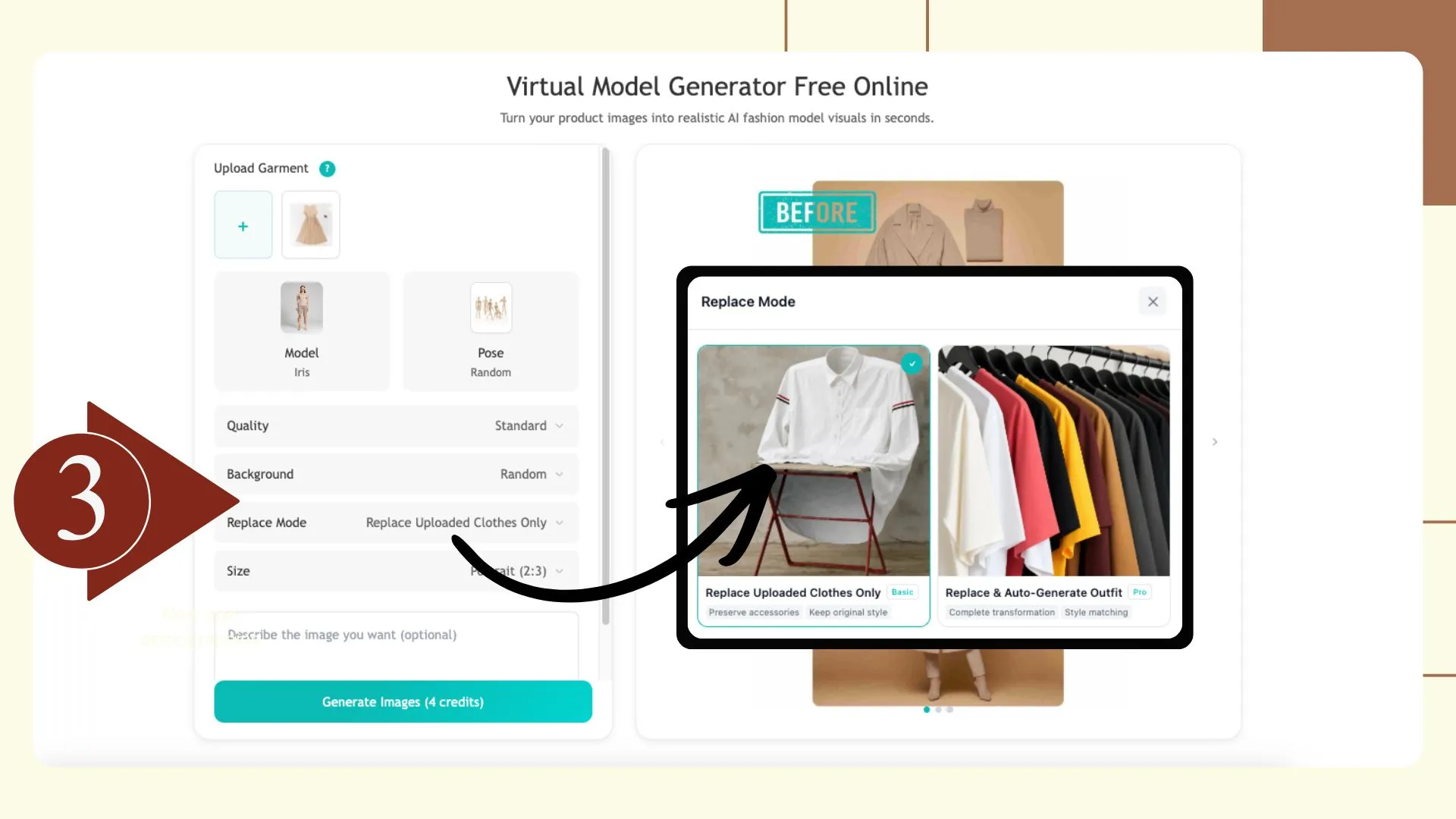
Step 3: Use Replace Mode (Optional)
- Replace Uploaded Clothes Only: Swap only the items you upload while keeping all other outfit details and accessories intact.
- Replace & Auto-Generate Outfit: Replace your uploaded clothes and automatically generate a complete outfit that matches style, color, and fit.
This feature allows brands to test different styling combinations without repeating the photoshoot process. For example, you can showcase a dress on multiple virtual models or create seasonal variations of the same outfit effortlessly. 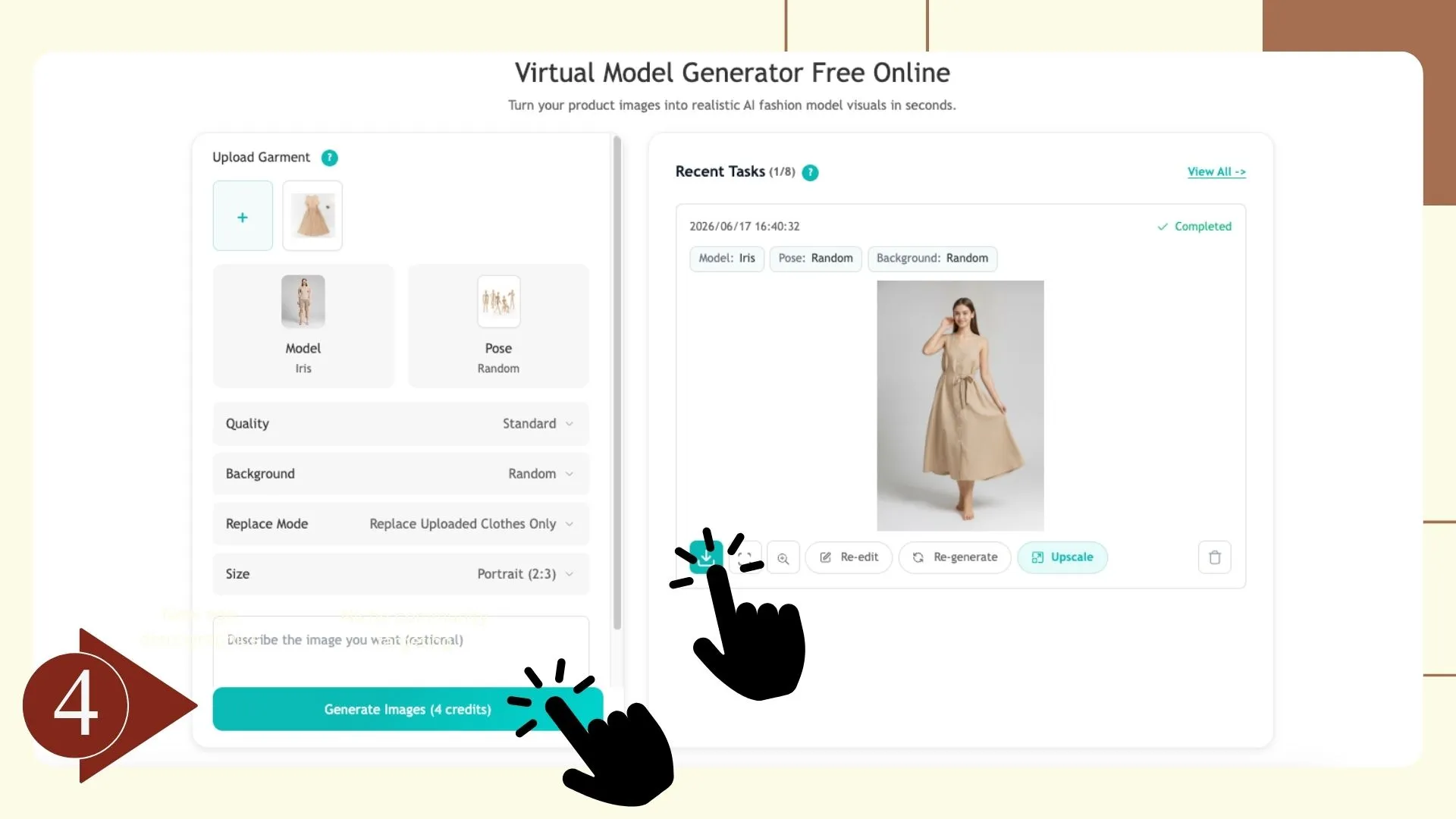
Step 4: Generate and Download Images
After setting up your model, pose, background, and optional Replace Mode, generate the images in high resolution. Download them instantly for use on product listings, social media ads, lookbooks, and marketing campaigns. You can even batch-generate multiple images to speed up content creation for large collections.
Key Advantages of Using Virtual Models
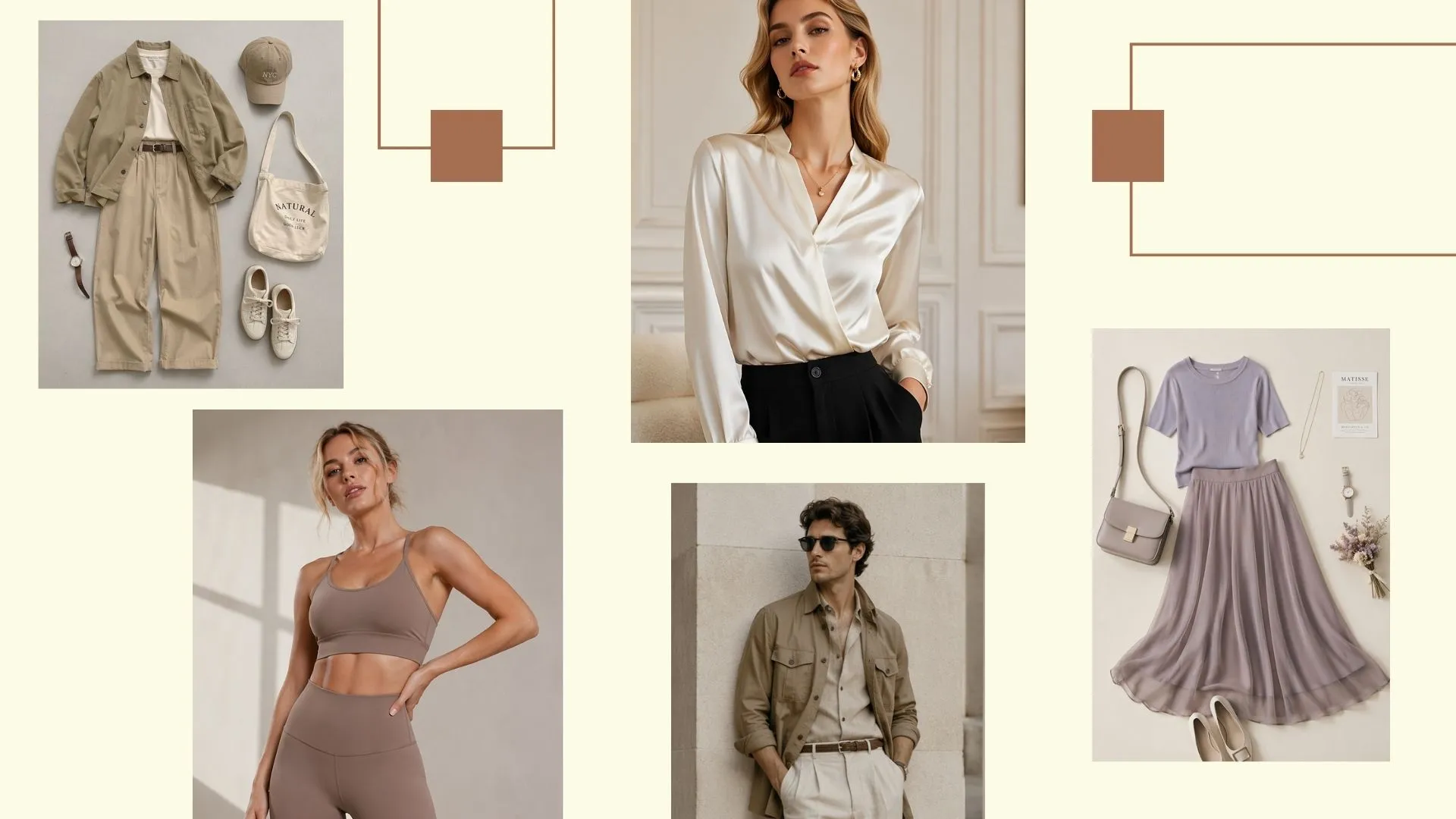 Switching to virtual models is not just about speed or cost—it’s about changing how fashion brands produce and scale visual content. Instead of relying on slow, resource-heavy photoshoots, teams can now generate consistent, high-quality product visuals on demand.
One of the biggest improvements brands notice is how quickly collections can go live. Without waiting for studio schedules, model availability, or post-production delays, new product images can be created almost instantly, helping teams react faster to trends and seasonal demand.
Cost efficiency is another major shift. Traditional photoshoots often require significant budgets for models, studios, and production teams. Virtual models dramatically reduce these costs, making it possible to allocate resources toward marketing, advertising, and scaling product lines instead.
Just as important is visual consistency. Whether you’re selling on Shopify, Amazon, or your own website, maintaining a unified brand look is much easier when every image is generated under controlled styling conditions. This helps build stronger brand recognition across all channels.
Virtual models also open the door to more inclusive storytelling. Instead of being limited by casting availability, brands can present clothing on a wide range of model types, helping products connect with different audiences more naturally.
On the creative side, flexibility becomes a real advantage. Teams can easily explore different poses, backgrounds, and styling directions without organizing additional shoots, making it easier to test ideas and iterate faster. You can also refine your images instantly by using the Change Background for Free tool to adjust settings and maintain a polished, professional look.
Finally, the quality is no longer a compromise. Modern virtual model systems can produce photorealistic images that are suitable for product pages, ads, and digital campaigns, giving brands a professional output without the traditional production overhead.
How Brands Actually Use Virtual Models
 In practice, virtual models are used across almost every part of the ecommerce workflow. Product pages benefit from clearer on-body presentation, helping customers understand fit and style more confidently. Lookbooks and seasonal campaigns can be built without coordinating physical shoots, which makes launching new collections significantly easier.
Marketplaces like Amazon, Etsy, and Walmart also benefit from consistent visual standards, while social media teams can quickly generate multiple ad creatives without restarting the production process each time. Even virtual try-on style experiences become more accessible, helping shoppers visualize products before purchase and reducing uncertainty.
What Actually Matters When Using Virtual Models
Getting great results from virtual models is less about technical complexity and more about understanding what actually affects output quality in real ecommerce workflows. Brands that perform well with virtual model systems usually focus on a few practical fundamentals rather than overcomplicating the process.
One of the most important factors is the quality of the input product image. Clean lighting, clear shape definition, and accurate garment presentation directly influence how realistic the final on-model result will look. Even the most advanced virtual model systems rely heavily on strong source material to produce consistent output.
Another key factor is how brands use poses and backgrounds. Instead of treating them as cosmetic choices, high-performing teams use different poses to highlight product structure—such as fabric flow, fit, or silhouette—while backgrounds are used to match campaign context, whether for ecommerce listings or social media ads.
For larger product catalogs, consistency becomes more important than creativity. This is where structured workflows matter. Generating visuals in a consistent style across hundreds of SKUs helps maintain a unified brand identity, especially for ecommerce stores operating across multiple channels.
Beyond these basics, there are several additional factors that often separate average results from high-performing visual systems:
- Input clarity matters more than model complexity — simple, well-shot product images outperform heavily edited inputs
- Consistency beats variation at scale — especially for marketplaces like Amazon or Shopify where brand trust is visual-first
- Pose selection impacts perceived fit — subtle changes in posture can significantly affect how customers understand sizing and drape
- Background alignment improves conversion — lifestyle vs studio-style visuals should match the sales channel
- Brand alignment is non-negotiable — even AI-generated visuals need to feel like part of a unified brand system
- Workflow repeatability matters for scaling — teams benefit more from repeatable processes than one-off creative experiments
When these elements are aligned, virtual models become more than just a content tool—they become a structured system for scaling ecommerce visuals efficiently while maintaining brand consistency across every channel.
Conclusion
Virtual models are quickly becoming part of how modern fashion brands create and publish content. Not because they replace creativity, but because they remove a lot of the friction that slows teams down—budget limits, production delays, and constant reshoots.
For most ecommerce teams, the shift is pretty straightforward: less time coordinating shoots, more time actually launching and testing products in the market.
Whether you’re updating product pages, running ads, or building seasonal campaigns, virtual models simply make it easier to keep up with how fast fashion moves today.