Remove Text from Image Online
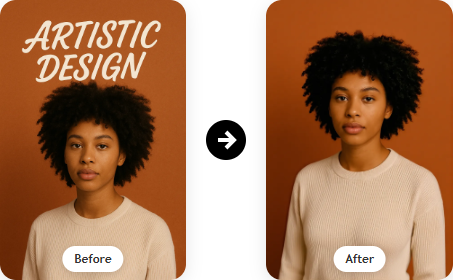
Use our free text remover from image to erase words, watermarks, or captions in seconds. Remove text from image online fast, clean, and free.
Or Drop an image here
Supported Formats:
Free Text Remover | Remove Text from Image Online
Use our free text remover from image to erase words, watermarks, or captions in seconds. Remove text from image online fast, clean, and free.
Try Free AI Text Remover
Remove Text from Multiple Product Photos in Seconds
When preparing product images for your online store, unwanted text or watermarks can easily distract potential customers. With our Text Remover, you can clean up multiple images quickly and keep your workflow efficient. For example, if you have a batch of product photos with promotional text, labels, or watermarks, simply upload them and remove the distractions in seconds. If you also need to refine the surrounding image area, you can use our free magic eraser to clean up extra imperfections and achieve a more polished final result.


Clean Up Your Marketing Materials in Just a Few Clicks
Marketing materials like flyers, brochures, and online ads often need quick updates before launch. Whether you are refreshing an old design or removing outdated details, our Text Remover helps you remove unwanted text from images in just a few clicks. For example, if a flyer still shows old contact information or expired promotional copy, you can erase it quickly and prepare the design for reuse. If your design also includes unwanted visual distractions beyond text, you can remove objects from an image to keep the layout cleaner and more professional.


Remove Words from Social Media Graphics in a Snap
Social media graphics can quickly feel cluttered when too much text competes with the visual message. If you are creating content for Instagram, Facebook, or X, our Text Remover makes it easy to simplify the composition and keep the focus on the image itself. For instance, if a quote graphic feels overcrowded or an old promotional line no longer fits your brand, you can remove the extra words in seconds. For more precise edits, especially when replacing or refining existing wording, our photo text editor online can help you make cleaner text-focused adjustments.


Erase Text from Family Photos or Old Memories
Old family photos often include unwanted date stamps, captions, or watermark text that take attention away from the memory itself. Our Text Remover helps you erase those distractions while preserving the original look of the image. Imagine finding a beautiful wedding photo or childhood picture with text covering part of the scene. In just a few clicks, you can restore a cleaner version and make the image feel timeless again. If you want to further improve the overall presentation, you can also try our free background remover to simplify distracting backdrops and make treasured memories stand out even more.


Clean Text from Scanned Documents in a Flash
Scanned documents like contracts, receipts, or notes often have unwanted text, such as background annotations or watermarks. Our Text Remover allows you to clean text from images in no time, making your documents look more professional. For instance, if you have a scanned receipt with a watermark or an old contract with handwritten notes in the background, simply upload the image and remove the text with ease. Whether you need to clean up a single page or a small stack of documents, our tool makes it quick and easy to get clear, clean results.


How to Remove Text from an Image in 3 Simple Steps

Step 1: Choose Your Mode

Step 2: Process Your Image

Step 3: Preview and Download
Where Text Removal Helps Most
Need to Remove Text From Image for Product Photos?
When you're preparing product photos, the problem is often not the product itself, but the extra words sitting on top of it. A temporary label, printed packaging text, or an old promo message can make the image feel messy and less premium.

A Text Eraser for Quick Marketing Updates
Marketing visuals change all the time. A sale date expires, a slogan gets replaced, or a banner needs one small update. In cases like this, a text eraser is much faster than rebuilding the whole design from scratch.

Photo Text Remover for Social Media Posts
Social content can look crowded very quickly. A cover image may have too many lines, an old caption, or extra words that pull attention away from the visual. Using a photo text remover helps bring the focus back and makes the post feel cleaner at a glance.

Why Clean Text from Images Before Posting?
Sometimes an image is almost ready, but something still feels off. Maybe there is leftover sample text, a test label, or a note that was never meant to stay. Taking a moment to clean text from images before posting can make the final result look much more polished.

Remove Words from Mockups Without Starting Over
Mockups often contain placeholder copy, sample branding, or old text that should not appear in the final preview. Instead of redoing the full layout, it is often easier to remove words from specific areas and keep the rest of the design intact.

A Text Remover for Real Estate and E-Commerce Images
In real estate and e-commerce, first impressions matter more than people think. A listing photo with old notes, leftover sale text, or visible watermarks can quietly reduce trust. A simple text remover helps the image look cleaner, newer, and more professional.

Why Choose Our Text Remover from Image?
Fast & Effortless
Remove text, watermarks, or captions instantly. No Photoshop, no complicated tools—just a browser and one click.
Professional, Natural Results
Our AI fills backgrounds intelligently so no one can detect where text once was. Each remove text from image edit looks flawless and ready for business or personal use.
Free & Accessible Anywhere
The free text remover from image works online across all devices. No logins, no downloads, no hidden costs—just upload, erase, and download.
What Users Are Saying


Frequently Asked Questions (FAQ)
Is it free to remove text from image?
Yes. Our free text remover from image gives you unlimited access with no watermarks or hidden costs. You can remove text from image online as often as you like, completely free.
How natural will my photo look after removing text from image?
Very natural. When you remove text from image, our AI rebuilds colors, patterns, and textures seamlessly. Whether it's a product photo, personal snapshot, or scanned file, edits look flawless.
What file formats are supported by the text remover from image?
You can upload PNG, JPG, JPEG, WEBP, or BMP files. The text remover from image works across formats commonly used in e-commerce, social media, and personal projects.
Can I remove multiple texts from one image?
Absolutely. Our text remover from image uses AI to recognize every text element in your photo—captions, watermarks, or labels—and seamlessly remove text from image online in one go, while keeping the background natural and consistent.
How to remove text from image?
There's no need for downloads or logins. You can simply remove text from image online in your browser—on desktop, tablet, or mobile—anytime, anywhere.
Can I remove text from an image using AI?
Yes. Our AI text remover can automatically detect and erase unwanted text from your image in just a few seconds. If you want more control, you can also use Manual Erase mode to brush over text, labels, captions, or watermarks yourself.
Can I remove text without affecting the background?
Yes. Our text remover from image is designed to remove unwanted words while preserving the original background. The AI rebuilds surrounding colors, textures, and patterns naturally, so the cleaned area blends in smoothly instead of looking patched or obvious.
Will removing text reduce image quality?
No. When you remove text from image online, the tool keeps the original image quality as much as possible. Whether you are editing a product photo, social media image, or personal picture, the result stays clear, sharp, and natural-looking.
What kinds of text can I remove from an image?
You can remove many types of text, including captions, watermarks, labels, logos, signs, overlays, and printed words in the background. Auto Mode works well for clear and readable text, while Manual Erase gives you more precise control for stylized, curved, or harder-to-select text.
Can I use the text remover on mobile devices?
Yes. You can remove text from image online directly in your browser on desktop, tablet, or mobile. Whether you are using iPhone, Android, or a laptop, the tool works smoothly without requiring software installation.
Can I edit the image further after removing text?
Yes. After removing text, you can preview and download the cleaned image for further editing, sharing, or design use. This is especially useful if you want to reuse the image for e-commerce listings, social posts, presentations, or marketing materials.
Can I replace text in an image after removing it?
Yes. You can first use the text remover from image to erase the old words, then add new text later in your preferred editor or design workflow. This is helpful for updating banners, product labels, mockups, or promotional graphics without recreating the whole image.