Skip to content
How to Use an AI Video Generator for E-commerce Product Videos
Product photos can explain what an item looks like. A short product video can also show scale, movement, setup, texture, or the moment a customer would use it. The useful question is not whether an AI Video Generator can make a polished clip. It is whether the clip resolves one buying question without changing the product or making a promise the store cannot support. This workflow is for e-commerce teams that need to make focused product videos from approved assets. Start with EzRemove's AI Video Generator when you want to turn a prompt, existing product image, or visual reference into a short clip without working in a traditional editing timeline.
Begin with one shopper question, not a generic video request
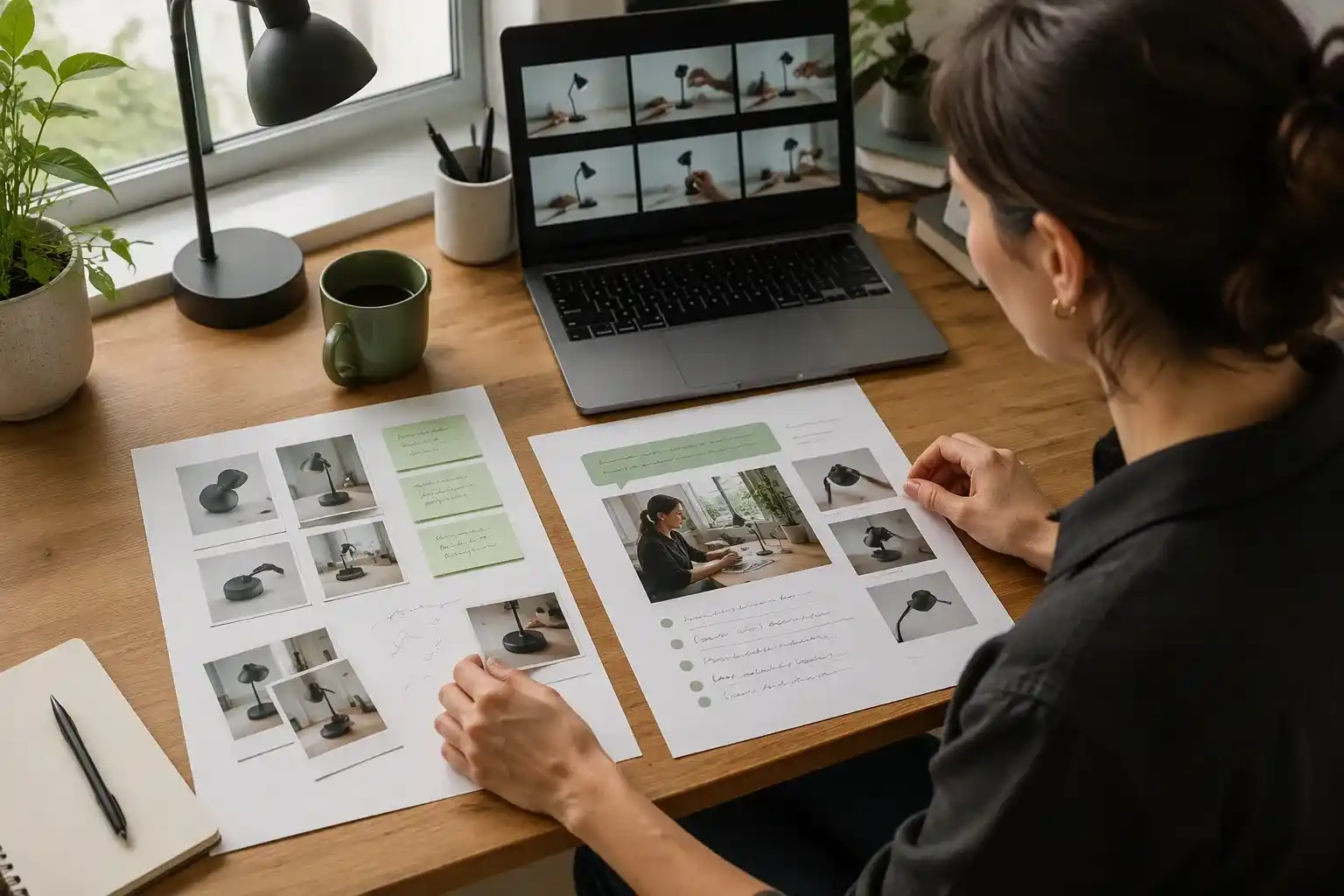
Pick one question that blocks the next action on a product page or in an ad. For a travel mug, the question might be whether it fits in a car cup holder. For a skincare bottle, it might be what the texture and application look like. For a compact lamp, it might be how much desk space it takes. A video can show one of these things clearly; trying to answer every question in a few seconds usually creates a vague montage.
Write a one-sentence brief before you generate: product, audience, question, proof to show, channel, and one desired action. For example: "For first-time home-office shoppers, show the lamp beside a keyboard and notebook so they can judge its footprint; use a vertical paid-social cut that sends viewers to the product page." This is specific enough to guide both the prompt and the review.
Avoid starting with style words alone, such as "premium," "viral," or "cinematic." They can influence the look, but they do not tell a model what evidence the shopper needs. When a visual choice conflicts with product clarity, favor clarity.
Prepare assets that protect product accuracy
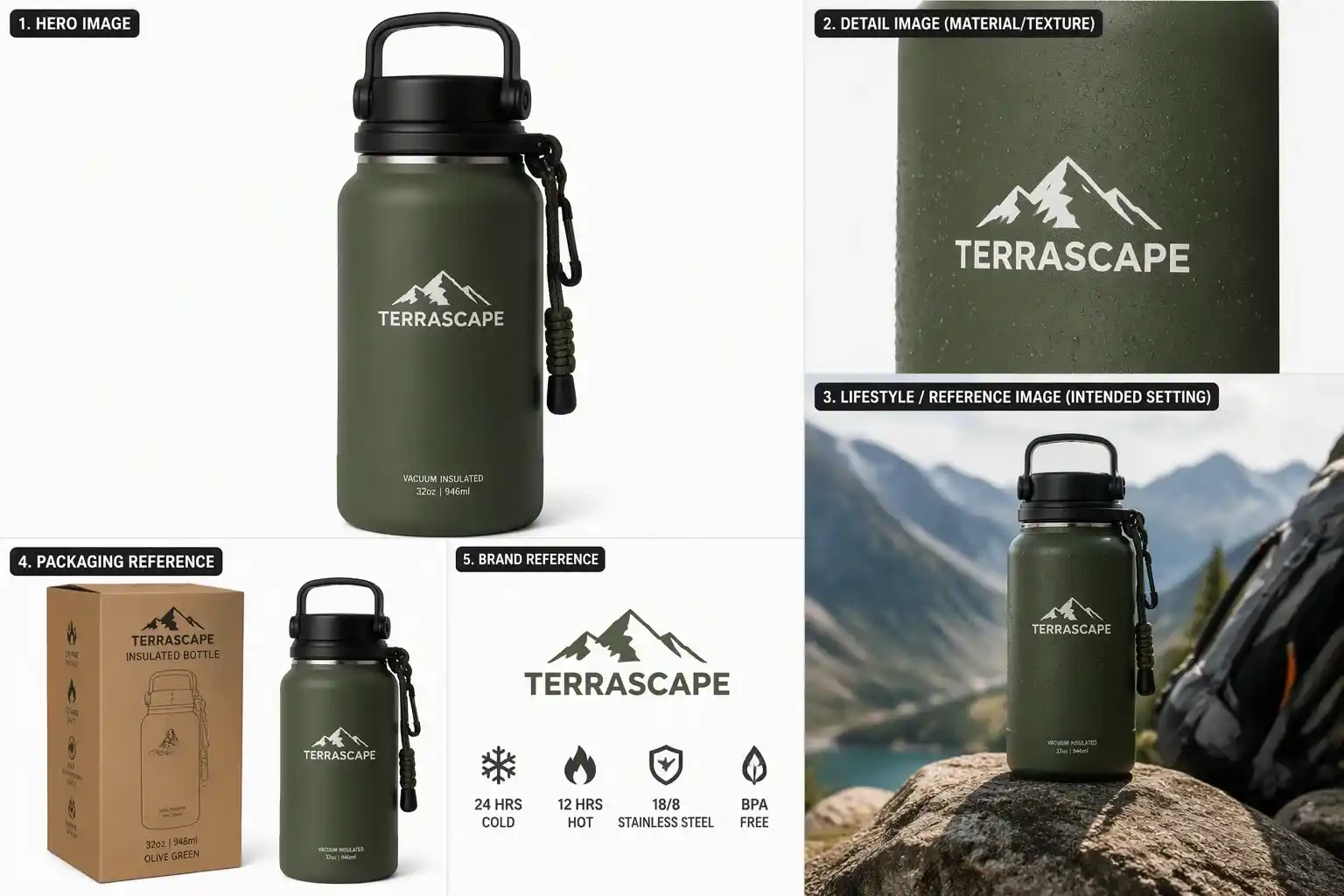
Use an approved source image that makes the SKU easy to identify. The product should be in focus, well lit, and large enough in frame that its defining shape and color are visible. Keep the original listing image, approved packaging view, and any required brand reference available while you review outputs. If a detail must remain exact, such as label copy, a printed pattern, a connector, or a safety feature, do not rely on generated motion to prove it.
Prepare a small asset pack rather than uploading every image you have. Include the hero image, one detail image if material or texture matters, and a reference image for the intended setting when appropriate. The reference should establish a factual visual direction, not invite the model to invent a new version of the product.
Clean source material reduces ambiguity before video generation. For catalog imagery that needs a new setting or controlled variation, the related guide on using an AI product image generator for e-commerce explains how to start from a clear product image and refine the scene. If the listing image needs isolation first, you can remove the background to create cleaner product edges before generating the video.
| Asset | What it should establish | Do not use it to prove |
|---|---|---|
| Hero product image | SKU shape, color, and overall appearance | Tiny label text or fine specification details |
| Detail image | Texture, hardware, or material | A moving demonstration the photo does not show |
| Scene reference | Lighting, setting, and composition direction | Product compatibility or performance claims |
| Product facts sheet | Supported wording for captions and voiceover | Visual evidence the image cannot provide |
Choose the generation mode that matches the starting material
The right mode depends on what you already know and what you need to preserve. EzRemove offers text-to-video for a scene conceived from a written description, image-to-video for animating a product or lifestyle image, and reference-to-video when visual references should guide the look and movement. For a product page where the existing product photo is the source of truth, image-to-video is usually the sensible starting point because the prompt adds motion rather than trying to recreate the SKU from scratch.
Use text-to-video for supporting scenes where exact product details are not the proof, such as an abstract atmosphere opener or a broad context shot. Use reference-to-video when a campaign has an approved visual direction and the team needs the generated scene to stay closer to that direction. These are creative choices, not guarantees that every rendered frame will be accurate, so the source asset and the final review still matter.
| Starting point | Best first choice | Why it fits | Review risk |
|---|---|---|---|
| Approved product photo | Image-to-video | Preserves a known product view while adding motion | Shape, logo, label, and color drift |
| Written concept with no product close-up | Text-to-video | Lets the team explore a setting or broad motion idea | Invented product details or unsupported claims |
| Approved mood or campaign reference | Reference-to-video | Helps maintain a chosen visual direction | Over-copying the reference or losing SKU clarity |
How to use the AI Video Generator
Once the shopper question and source assets are ready, the generation workflow becomes more concrete. For an e-commerce product video, the goal is not simply to create motion. The goal is to choose the input method that best protects product truth, describe the intended selling moment, and review the generated clip before it becomes customer-facing content.
Use the three-step workflow below as a practical path from product asset to usable product video draft.
Step 1. Choose a generation mode and add your product input
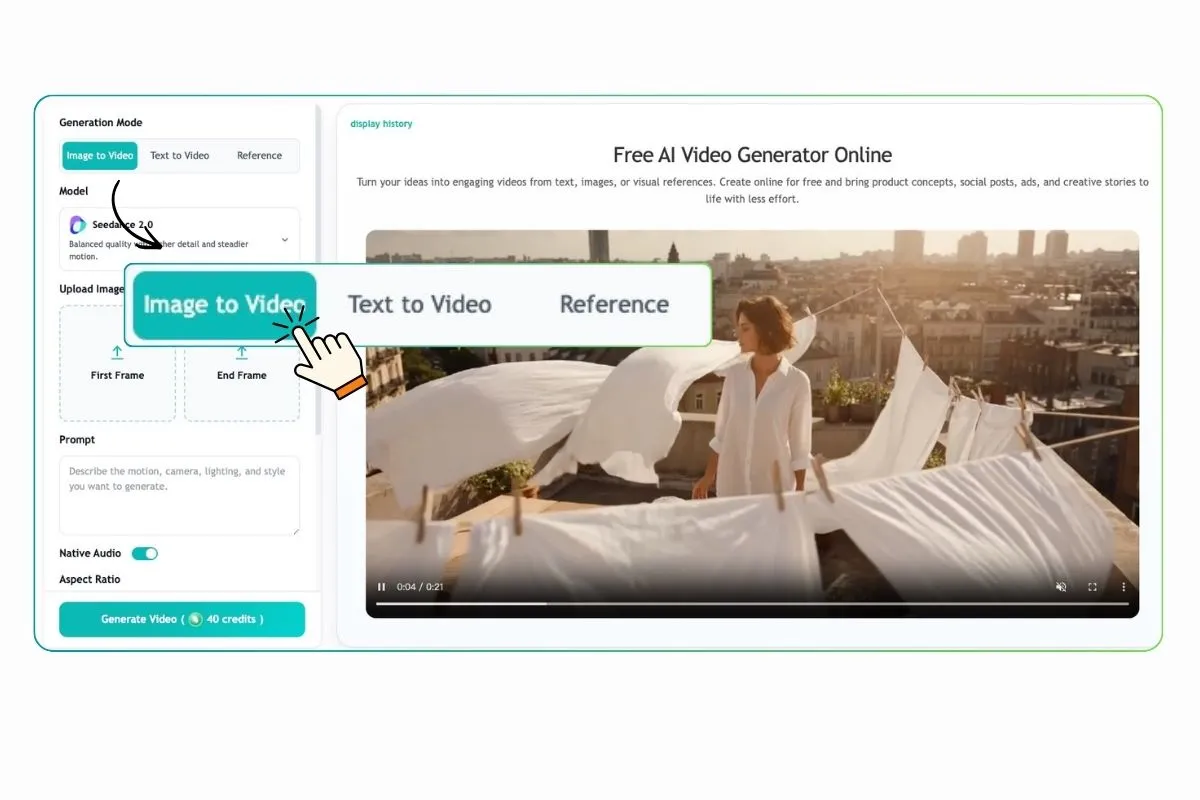
Select Image to Video, Text to Video, or Reference to Video based on the material you already trust. For most product-page clips, start with Image to Video and upload a required first-frame image that clearly defines how the video begins. If the ending matters, such as showing a closed lid, a final tabletop position, or a finished setup, add an optional end-frame image to guide how the scene finishes.
Use Text to Video when you are creating a supporting scene from a written description, such as a broad lifestyle context or a simple atmospheric cutaway where exact product details are not the proof. Use Reference to Video when you have an approved image or video reference for the subject, visual style, composition, movement, or overall creative direction. In all three cases, the input should support the buying question you chose earlier instead of inviting the model to invent unrelated visual drama.
Step 2. Enter a prompt and choose video settings
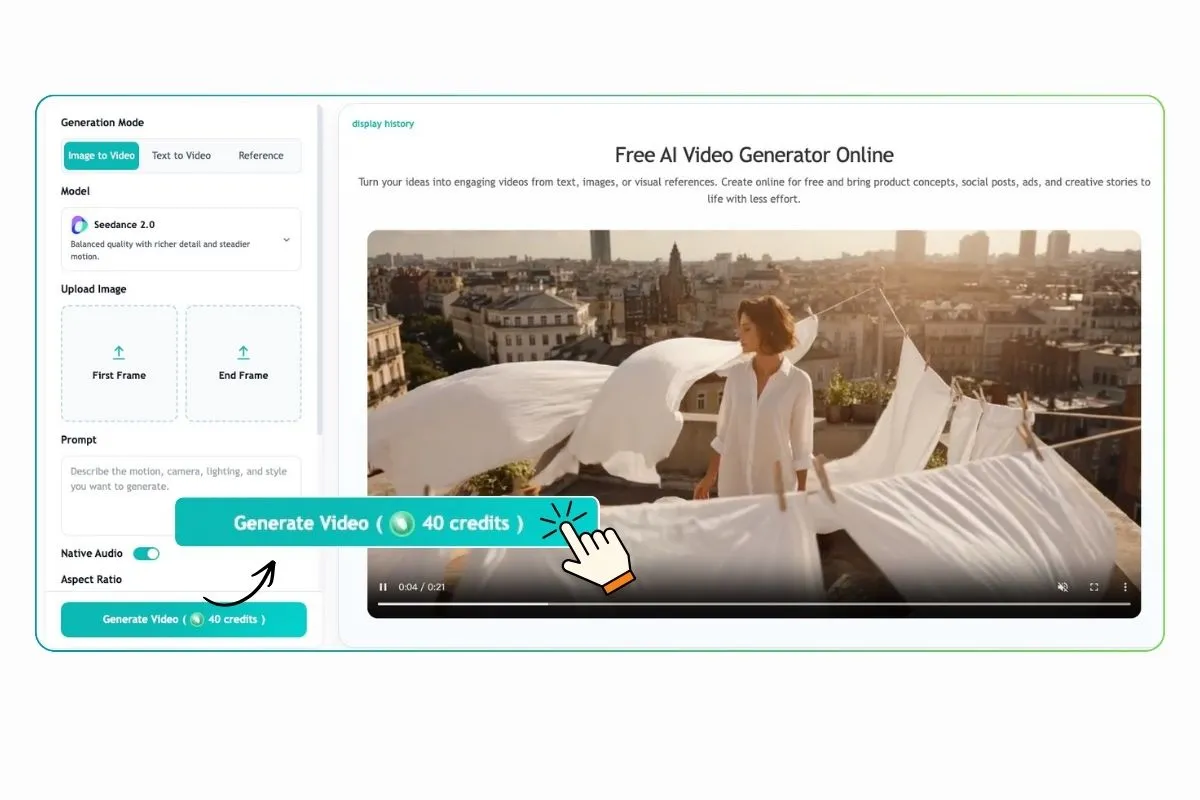
Describe what should happen in the video with enough detail to make the output reviewable: the product, the action, subject movement, camera direction, speed, atmosphere, framing, and visual style. A product video prompt should also name constraints, such as keeping the product shape, color, packaging, or material consistent with the uploaded reference and avoiding extra text, logos, accessories, or unsupported use cases.
Next, choose the available AI video model that fits the balance you need between generation speed, visual quality, motion control, and creative style. Then set the aspect ratio, duration, and resolution for the placement. A vertical 9:16 clip may suit paid social, while a product-page module may need a wider composition with more room for the item and use context. More advanced models, longer durations, and higher-resolution output may require more credits, so check the displayed cost before generation.
Step 3. Generate, review, and refine the product video
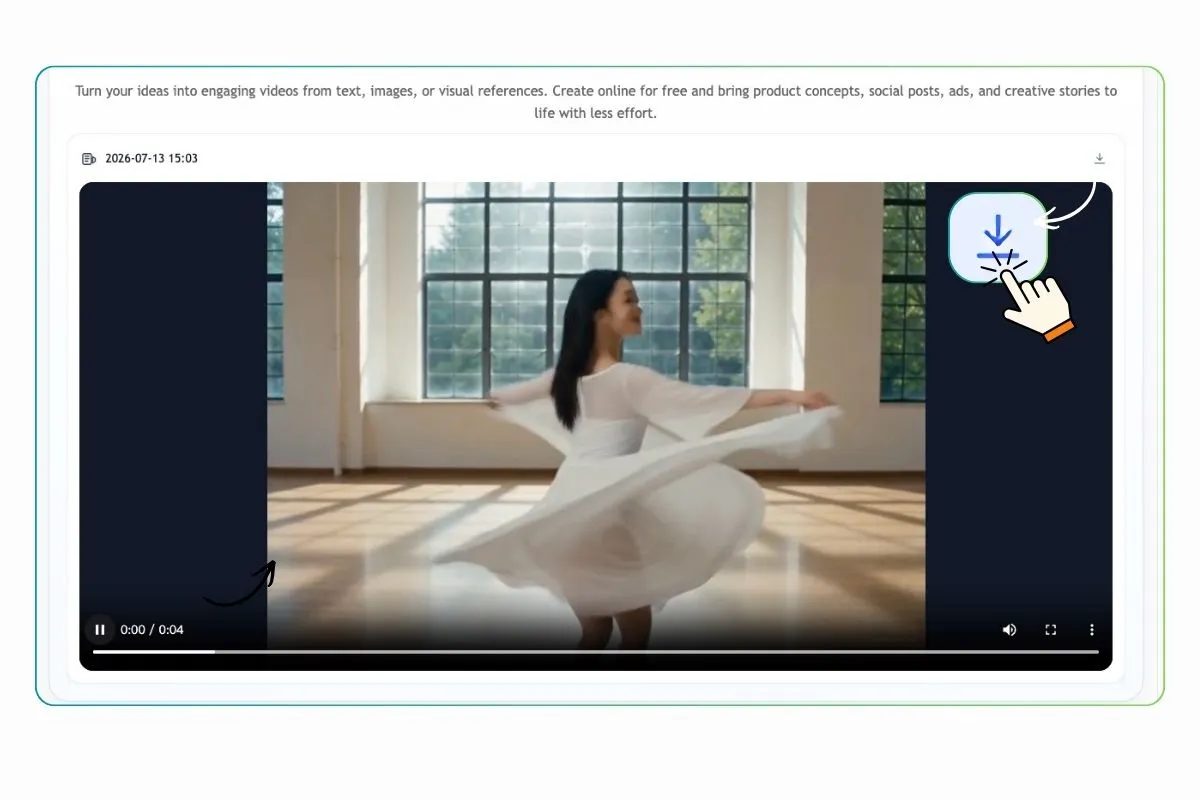
Click Generate Video to turn the input into motion, then review the result as a product marketer, not just as a viewer. Check movement, subject consistency, framing, product accuracy, and whether the first second answers the shopper question. If the clip looks attractive but changes the SKU, hides the proof, or implies something the product page cannot support, treat it as a draft that needs refinement.
Refine the prompt, replace the uploaded product image or reference, add or change the end frame, or adjust the model and output settings until the result is useful enough to test. Once the video matches the intended product story, download it for social media, advertising, product pages, presentations, or other approved e-commerce creative placements.
Write a prompt as a shot instruction
Start with the product and the evidence the shopper needs, then add only the visual controls that affect that evidence. A useful prompt names the subject, setting, action, camera movement, light, framing, duration goal, and exclusions. It should also tell the model what not to alter when that constraint matters.
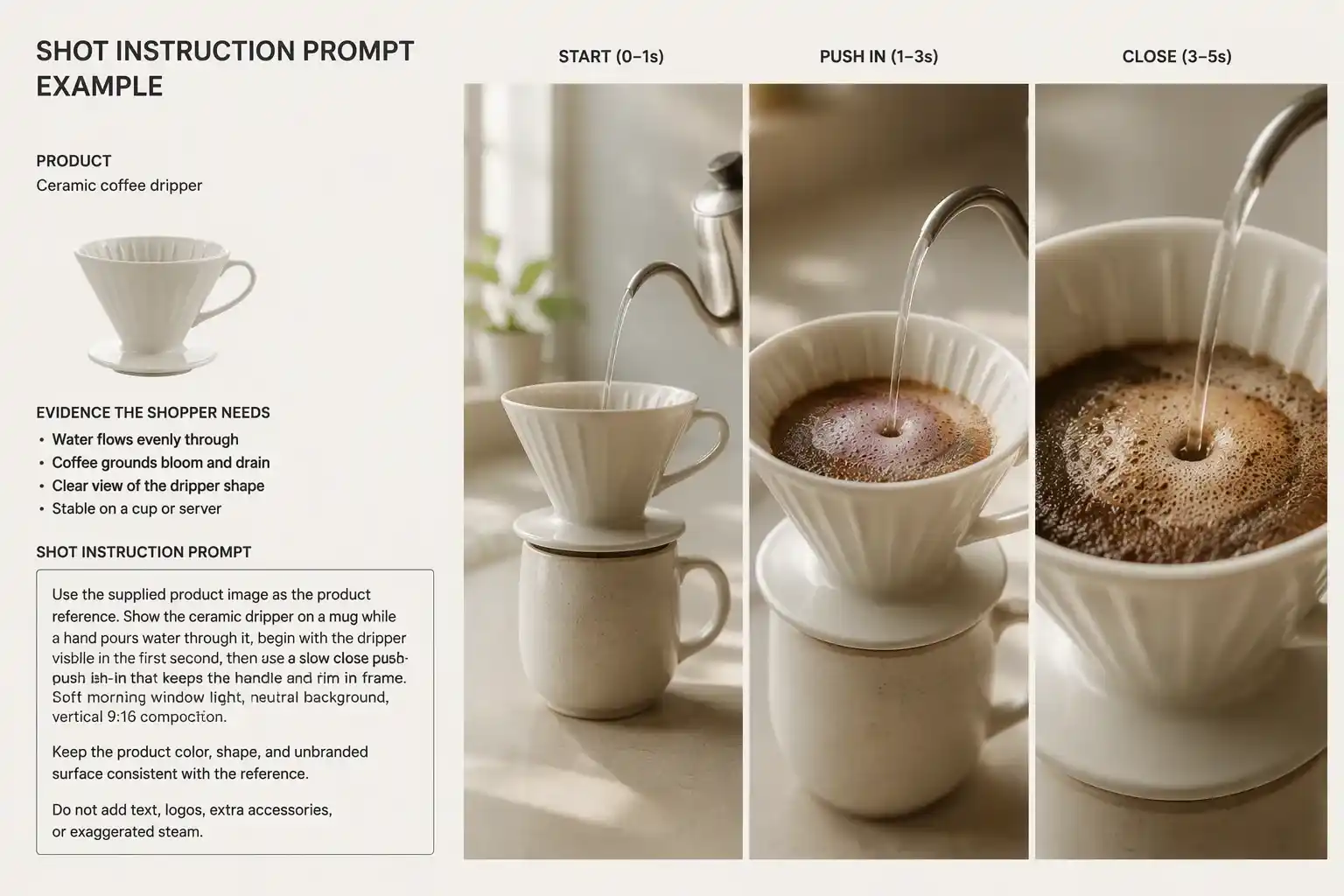
For example, a prompt for a coffee dripper might read: "Use the supplied product image as the product reference. Show the ceramic dripper on a kitchen counter while a hand pours water through it; begin with the dripper visible in the first second, then use a slow close push-in that keeps the handle and rim in frame. Soft morning window light, neutral background, vertical 9:16 composition. Keep the product color, shape, and unbranded surface consistent with the reference. Do not add text, logos, extra accessories, or exaggerated steam." The point is not ornate language. The point is to make the intended proof reviewable.
Keep each first render simple. One location, one action, and one camera move make it easier to diagnose what changed. If the product drifts, shorten the action or revise the motion instruction before adding more scene complexity. When a video needs multiple beats, generate short clips separately and assemble only the clips that pass review.
Generate a small set of meaningful versions
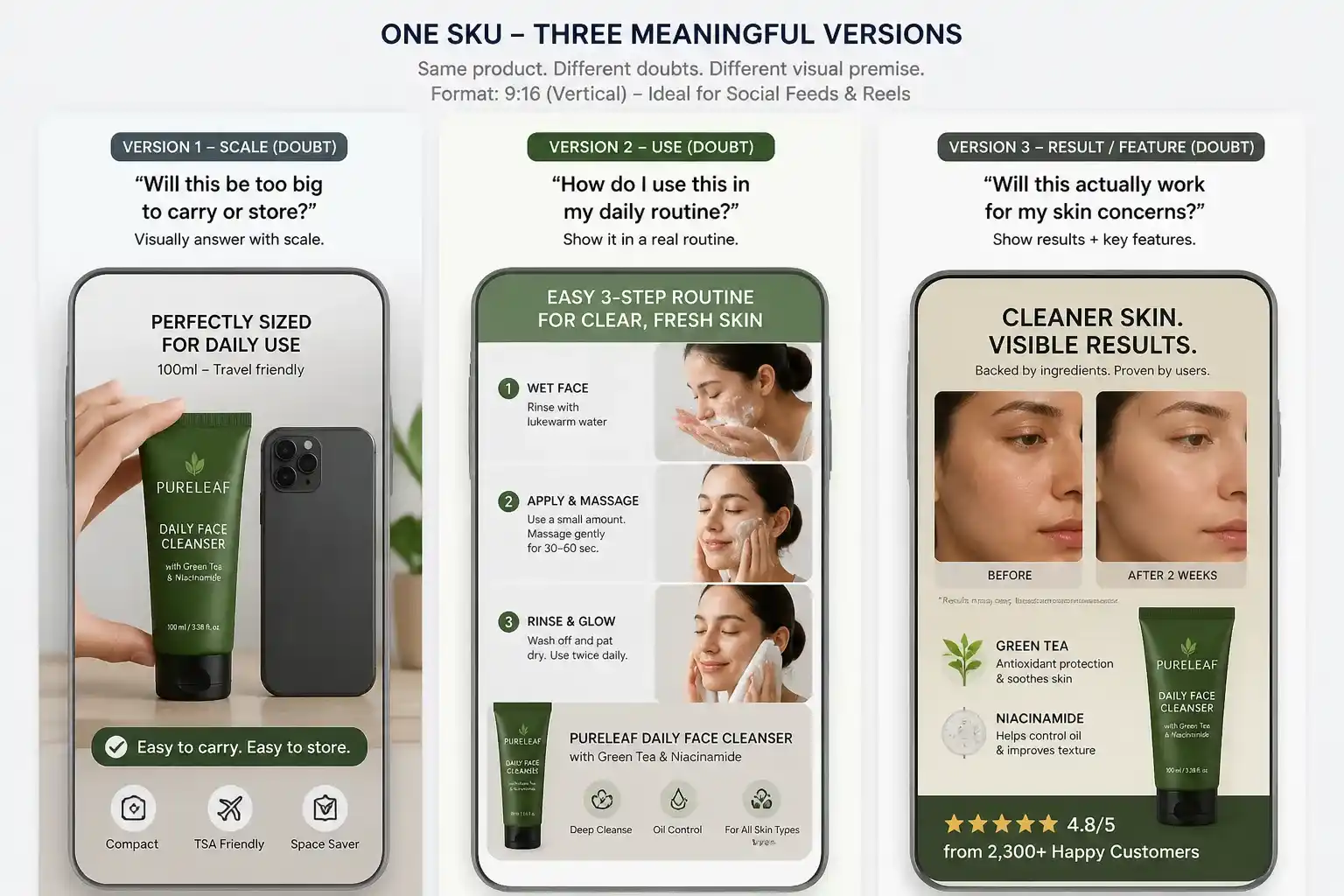
AI makes it tempting to create many near-identical clips. Instead, build a compact version plan around different shopper doubts. For one SKU, test a scale version, a use version, and a result or feature version when the product facts support each one. The visual premise should change, not just the color grade or music.
Match the frame to where the video will be viewed before you generate. A vertical cut may suit a social placement, while a wider product-page module may need a different composition. Do not crop a clip after the fact and assume the product remains visible. Check that the product, hands, captions, and key proof all survive the frame.
Set a limit before generation. Three clearly different concepts are usually more useful than ten cosmetic variations because each one creates a decision the team can explain later. A store with a new product may begin with the doubt most likely to block the first purchase; a mature catalog can prioritize a recurring FAQ or a weak point in the current product page. Do not produce a lifestyle version merely because it looks attractive when the shopper first needs scale or setup proof.
Keep the comparison fair. Use the same SKU, offer, placement, and landing destination for versions that are meant to answer the same question. If the use demo and detail version also have different hooks, captions, and audiences, the result cannot reveal which creative choice mattered. Record the purpose of each variation before it goes live so the next production round builds on a real learning rather than an impression.
| Version | Shopper doubt it addresses | Essential first-second proof | What to compare later |
|---|---|---|---|
| Scale | Will this fit my space? | Product beside a familiar reference object | Product-page engagement and add-to-cart behavior |
| Use | How does it work in real life? | Product shown during one believable action | Completion and product-page clicks |
| Detail | What is the finish or feature? | Close view of one approved material or function | Attention to the key feature and downstream actions |
Review each render before it becomes marketing content
Treat generated video as a draft that needs a product-accuracy review. Watch it once with sound off, then once with the intended caption or voiceover. With sound off, a viewer should still be able to identify the item, see the intended proof, and understand why it matters. With sound on, verify that narration and text match the approved product facts.
Check the opening frame, every close-up, and the final frame. Look for changed proportions, unstable edges, altered packaging, unreadable generated text, impossible hand interactions, and background elements that imply an unsupported use case. A pleasing shot is not ready if it changes the item or implies a performance claim the store cannot substantiate.
Decide in advance which issues are automatic rejections. Any invented label copy, missing safety detail, changed product geometry, or use scene that contradicts the product facts should fail review rather than receive a small edit. More subjective issues, such as pacing or the strength of the opening hook, can become a testable creative alternative. This distinction keeps brand and compliance review from being confused with performance optimization.
For close-ups where accuracy is essential, use the approved still image or filmed footage instead of a generated sequence. AI-generated motion is better used to add atmosphere, a gentle camera move, or a contextual scene around evidence that the team has already validated. A short cutaway that passes this rule is more valuable than a longer video that introduces doubt about the product itself.
| Review question | Pass condition | What to do when it fails |
|---|---|---|
| Is the SKU recognisable? | Shape, color, and key features match the approved source | Regenerate with a simpler motion or a tighter product reference |
| Does the clip show the promised proof? | Product and action are visible early and remain understandable | Revise the shot instruction or change the version concept |
| Are claims supported? | Captions and narration match the facts sheet | Remove or rewrite the claim; do not let visuals imply it |
| Does the format work in placement? | Product and proof remain visible in the final aspect ratio | Generate a placement-specific composition |
Publish as a test, then keep the learning
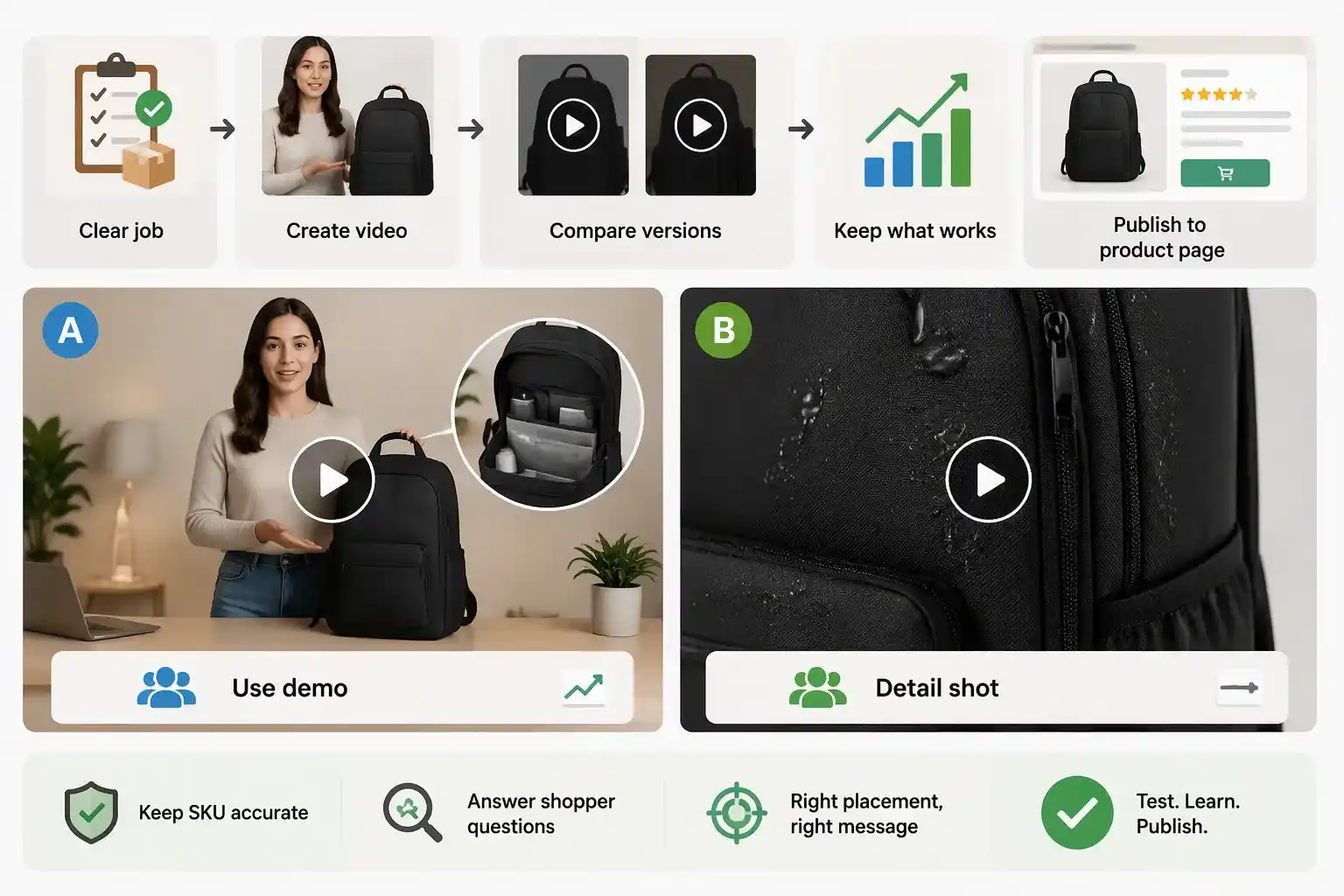
Before publishing, give the clip a clear job and a comparison version. A product-page video might aim to make a size or setup question easier to answer. A paid-social cut might test whether a use demonstration earns more qualified visits than a detail shot. Do not interpret views alone as proof that a version helps shoppers; compare the metric that fits the job, such as clicks to the product page, add-to-cart actions, or completed purchases when the volume supports a decision.
Keep a short record with the SKU, customer question, source asset, prompt version, placement, review notes, and outcome. This prevents the team from repeating a flawed prompt and makes successful creative logic reusable without treating one result as universal. When a result is inconclusive, change one meaningful element in the next version rather than rewriting everything at once.
An AI Video Generator is most valuable when it helps a store test clear evidence faster, not when it replaces product truth with decoration. For videos that include a presenter or spokesperson, you can also sync speech with the video to match the message more naturally. Keep only the versions that preserve the approved SKU, answer a real shopper question, and fit the final customer-facing placement.
Frequently asked questions
Can I make an e-commerce product video from a single image?
You can use image-to-video to animate an approved product image, but the output still needs review. It is best for motion that does not require the model to invent close-up details, product functions, or precise packaging text. Use an approved product image as the reference and keep the first motion request simple.
What should an AI product video show first?
Show the product and the buying question early. That could be a scale reference, a real use moment, or a close view of an approved feature. A slow cinematic reveal can work later, but it should not hide the information the viewer came to verify.
How many versions should I test for one product?
Start with a small set of genuinely different evidence angles, such as scale, use, and one relevant detail. The exact number depends on traffic and production capacity. What matters is that each version answers a different question and has a defined placement and comparison metric.
Which AI video generation mode is best for product videos?
Image-to-video is usually the best starting point when product accuracy matters because it begins with an approved product image. Text-to-video is useful for broader creative scenes, and reference-to-video can help when you want to follow a specific visual style, composition, or movement direction.
How long should an e-commerce product video be?
Most product videos work best when they are short and focused. A few seconds can be enough to show scale, texture, setup, or one use moment. If you need to explain multiple features, create separate short clips instead of forcing every message into one video.
What aspect ratio should I choose for an AI product video?
Choose the aspect ratio based on where the video will appear. Vertical formats often fit social media and short-form ads, while wider formats may work better on product pages, landing pages, presentations, or marketplace content. Always check that the product remains visible after cropping.
Can AI-generated videos be used in product ads?
They can be useful for ads when the video is reviewed carefully and does not make unsupported claims. Before using a generated clip in paid media, confirm that the product appearance, use case, caption, and landing page message all match what customers will actually receive.
How do I keep the product accurate in an AI-generated video?
Start with a clear approved product image, keep the prompt specific, and avoid asking for too much motion in the first version. Review the output for shape, color, label, packaging, scale, and use context. If the product changes in a meaningful way, regenerate or simplify the scene.
What should I include in an AI video prompt for e-commerce?
Include the product, setting, shopper question, desired action, camera movement, lighting, aspect ratio, and any details the model should not change. A strong prompt should make the result easier to review, not just more visually polished.
Should I use AI video for every product in my catalog?
Not every product needs a generated video. Start with products where motion helps answer a real buying question, such as size, setup, fit, texture, use, or before-and-after context. For simple products where photos already explain everything, a video may not improve the shopping experience.